
Home View
Relevant source files
The following files were used as context for generating this wiki page:
The Home View is the primary landing page of BiliScape, serving as the main content discovery interface for users. This component displays recommended videos, popular content, and live streams in a tabbed interface. It handles fetching data from Bilibili's APIs and rendering content in card format.
For information about other content display systems, see the Content Display Systems Overview.
Component Overview
The Home View is implemented as a class-based component that manages three primary content sections:
- Recommended videos (default view)
- Popular/trending videos
- Live streaming rooms

Sources: js/components/home.js:1-137, js/components/cards.js:1-138
User Interface Structure
The Home View displays content in a tabbed interface with three tabs:
- "推荐" (Recommended) - Default tab
- "热门" (Popular/Hot)
- "直播" (Live)
Each tab contains a grid of content cards that link to videos or live streams.

Sources: js/components/home.js:30-55, js/components/home.js:7-27
Implementation Details
Initialization and Display
The HomeView class initializes with the "recommand" tab selected by default and sets up event listeners for tab switching. The display() method renders the tabbed interface and loads the default content.
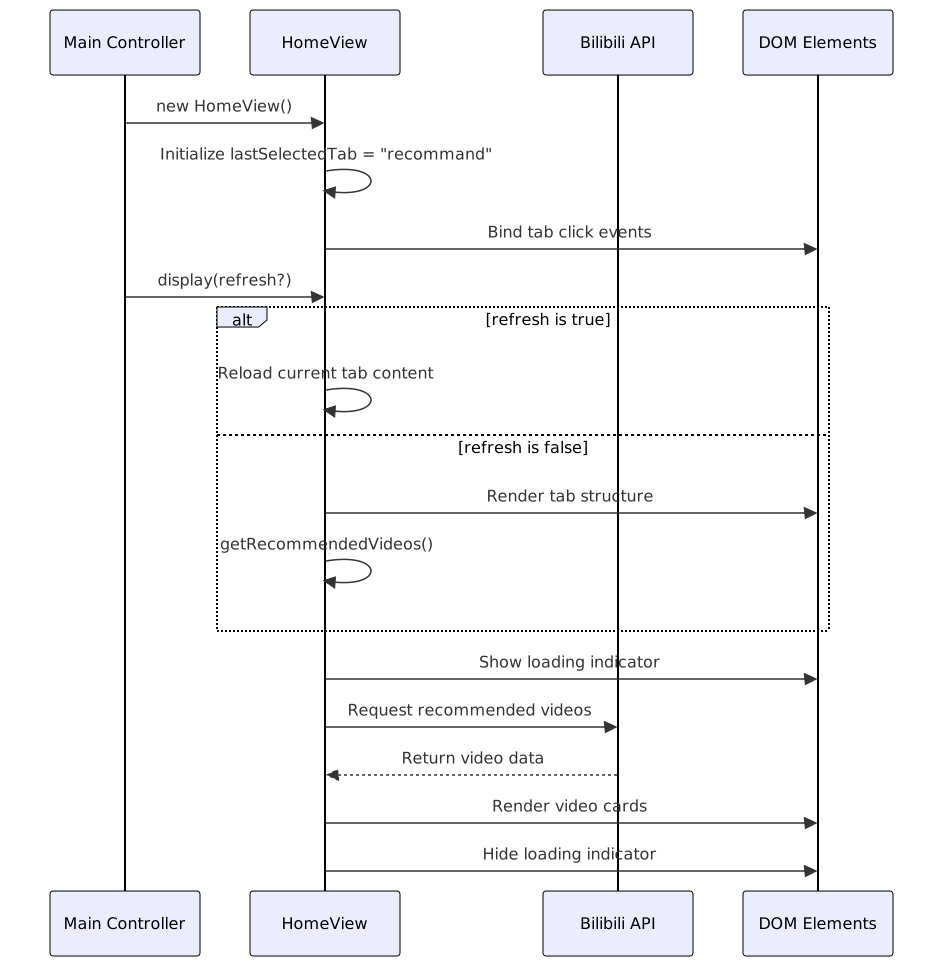
Sources: js/components/home.js:1-55
Content Loading Methods
The HomeView implements three methods to fetch and display different types of content:
- getRecommendedVideos() - Makes parallel requests to Bilibili's recommendation API and renders video cards
- getPopularVideos() - Fetches popular videos with additional metadata like like counts and recommendation reasons
- getLiveRooms() - Retrieves and displays live streaming rooms
Each method follows a similar pattern:
- Clear existing content
- Show loading indicator
- Make API request(s)
- Process returned data into a format suitable for card rendering
- Render content using the appropriate card template
- Hide loading indicator
Sources: js/components/home.js:57-136
API Integration
The Home View interacts with three Bilibili API endpoints:
| Method | API Endpoint | Purpose | Response Processing |
|---|---|---|---|
getRecommendedVideos() | api.bilibili.com/x/web-interface/index/top/rcmd | Fetches personalized video recommendations | Maps response items to video card format |
getPopularVideos() | api.bilibili.com/x/web-interface/popular | Retrieves trending videos | Maps response and includes like counts and recommendation reasons |
getLiveRooms() | api.live.bilibili.com/room/v1/Index/getShowList | Gets featured live streams | Maps response to live card format |

Sources: js/components/home.js:57-136, js/components/cards.js:1-137
User Interaction Flow
When a user interacts with the Home View, the following flow occurs:

Sources: js/components/home.js:7-27, js/components/home.js:57-136
Integration with Card System
Content in the Home View is rendered using card templates from the card module:
- Video content (both recommended and popular) uses
card.video() - Live content uses
card.live()
Each card is configured with:
- An image thumbnail
- Title (video/stream title)
- Creator information
- Navigation data (bvid, aid, or roomid)
When users click on these cards, the system navigates to the appropriate content using URL hash-based routing.
Sources: js/components/home.js:57-136, js/components/cards.js:1-137