
User Space
Relevant source files
The following files were used as context for generating this wiki page:
The User Space component in BiliChrome provides users with access to their Bilibili account information, video history, collections, subscriptions, and other user-related content. This document details the implementation and functionality of the User Space within the extension.
For information about general content display systems, see Content Display Systems.
1. Overview
The User Space serves as a personal dashboard that provides access to:
- User profile information (avatar, username, level, followers)
- Personal collections/favorites
- Subscription list (followed creators)
- Watch history
- Recent user activities/posts (dynamics)
- Watch Later queue
- Extension settings and plugin management
The implementation is centralized in the space.js file, with supporting card rendering provided by cards.js.
Sources: js/components/space.js:1-281
2. User Space Architecture
The User Space is structured around a main initialization function that populates the interface, with separate functions handling specific features when requested by the user.

Sources: js/components/space.js:4-197, js/components/space.js:199-269
3. Core Functions
The User Space component is built around the following key functions:
| Function | Purpose | API Endpoint |
|---|---|---|
spaceInit(refresh) | Initializes the entire User Space interface | Multiple |
getUserCard(uid, callback) | Retrieves user profile information | /x/web-interface/card |
getUserSpace(uid, isTop) | Displays a user's dynamic feed/posts | /x/polymer/web-dynamic/v1/feed/space |
getUserHistory() | Retrieves and displays watch history | /x/web-interface/history/cursor |
getUserSubscription(uid) | Displays followed users | /x/relation/followings |
getMyCollectionList() | Displays user's collections/favorites | /x/v3/fav/folder/created/list-all |
getCollectionById(fid, mediaCount) | Displays videos in a specific collection | /x/v3/fav/resource/list |
getWatchLater() | Displays videos in the Watch Later queue | /x/v2/history/toview |
Sources: js/components/space.js:4-35, js/components/space.js:37-100, js/components/space.js:102-114, js/components/space.js:116-141, js/components/space.js:143-161, js/components/space.js:163-181, js/components/space.js:183-197
4. Data Flow and API Integration
The User Space component relies heavily on Bilibili's API to retrieve user-specific data:
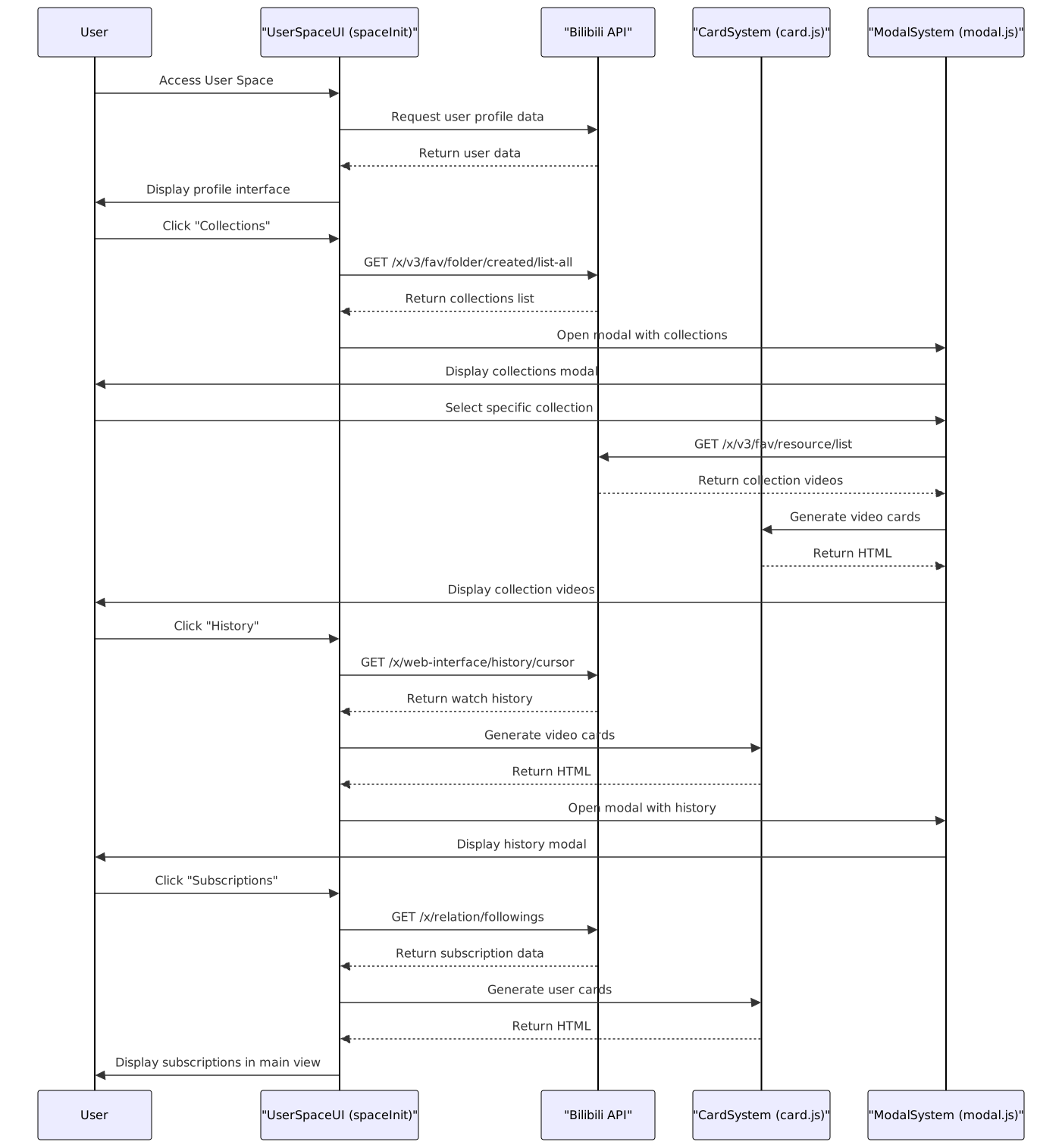
Sources: js/components/space.js:4-5, js/components/space.js:39-40, js/components/space.js:103-104, js/components/space.js:122-123, js/components/space.js:144-145, js/components/space.js:165-166, js/components/space.js:184-185
5. User Interface Implementation
The User Space interface is generated in the spaceInit() function and consists of a main profile card and a grid of feature cards:

The UI layout is constructed with HTML templates in the spaceInit() function, creating:
A top profile card (
myspace_topInfoBox) displaying:- User avatar
- Username and signature
- Level, gender, coins, and followers in chips
A grid of feature cards (
myspace_subSection), each linking to a specific feature:- Collections -
#myfav_${uid} - Subscriptions -
#mysubscription_${uid} - History -
#history_${uid} - Dynamics -
#uid_${uid} - Watch Later -
#watchlater_${uid} - Options -
#options - Plugins -
#plugins
- Collections -
Sources: js/components/space.js:204-267
6. Feature Implementations
6.1 User Profile Card
The user profile card is implemented using the getUserCard() function, which:
- Calls the Bilibili API to fetch user data
- Extracts relevant fields (name, avatar, level, etc.)
- Formats the data into an HTML card template
- Returns both the raw data and HTML via callback
// Example data structure returned by getUserCard
{
    data: {
        uid: "114514",
        name: "Username",
        sex: "男",
        face: "https://example.com/avatar.jpg",
        sign: "User biography",
        level: 5,
        fans: 1000,
        subscribe_sum: 50
    },
    html: "<!-- HTML template string -->"
}
Sources: js/components/space.js:4-35
6.2 User Dynamics
The getUserSpace() function handles retrieving and displaying a user's dynamic posts:
- Fetches user dynamics from Bilibili API
- Processes different content types:
- Videos (
DYNAMIC_TYPE_AV) - Formats with thumbnail and title - Text posts (
DYNAMIC_TYPE_WORD) - Displays text content - Image posts (
DYNAMIC_TYPE_DRAW) - Displays images with text
- Videos (
- Renders each post as a card in a modal window
- Includes the user's profile card at the top
Sources: js/components/space.js:37-100
6.3 Collections and Favorites
The collections system is handled by two functions:
getMyCollectionList():- Fetches all user collections
- Formats each collection as a card with title and description
- Displays collections in a modal window
- Each card links to the specific collection with
#fav_[id]_[count]
getCollectionById(fid, mediaCount):- Fetches videos in the specified collection
- Transforms API data to match the video card format
- Renders videos using the
card.video()function - Displays in a modal window with back navigation
Sources: js/components/space.js:143-161, js/components/space.js:163-181
6.4 Watch History
The getUserHistory() function:
- Fetches the 30 most recent watched videos
- Transforms API data to the video card format
- Renders the videos using
card.video() - Displays in a modal window
Sources: js/components/space.js:102-114
6.5 User Subscriptions
The getUserSubscription() function:
- Makes multiple API requests (pagination) to fetch followed users
- Transforms the data to match the user card format
- Renders users using
card.user() - Displays directly in the main container
- Includes a back button for navigation
Sources: js/components/space.js:116-141
6.6 Watch Later
The getWatchLater() function:
- Fetches videos in the Watch Later list
- Transforms data to match the video card format
- Renders videos using
card.video() - Displays in a modal window
Sources: js/components/space.js:183-197
7. Integration with Card System
The User Space relies on the card rendering system from cards.js to present content consistently:
| Card Function | Used For | Implementation |
|---|---|---|
card.video() | Videos in history, collections, watch later | js/components/cards.js:2-29 |
card.user() | User profiles in subscriptions list | js/components/cards.js:89-109 |
The card system standardizes the presentation of different content types while maintaining consistent UI design across the extension.
Sources: js/components/cards.js:1-138
8. Routing and Navigation
The User Space integrates with the extension's URL hash-based routing system:
| Hash Pattern | Function Called | Feature |
|---|---|---|
#uid_[id] | getUserSpace() | User dynamics |
#myfav_[id] | getMyCollectionList() | Collections list |
#fav_[id]_[count] | getCollectionById() | Specific collection |
#history_[id] | getUserHistory() | Watch history |
#mysubscription_[id] | getUserSubscription() | Subscriptions |
#watchlater_[id] | getWatchLater() | Watch later list |
This hash-based routing system enables state preservation during navigation and allows for direct linking to specific features.
Sources: js/components/space.js:225-225, js/components/space.js:235-235, js/components/space.js:239-239, js/components/space.js:243-243, js/components/space.js:247-247, js/components/space.js:251-251
9. Technical Notes
- The User Space uses jQuery for DOM manipulation and AJAX requests throughout
- A global variable
currentUidstores the current user ID for reference across functions - The
modalsystem is used for displaying most content in overlay windows - Navigation between views is handled through event listeners and the routing system
- All API requests are made directly to Bilibili endpoints with proper authentication
Sources: js/components/space.js:2-2, js/components/space.js:5-34, js/components/space.js:271-280