
Bilibili API Integration
Relevant source files
The following files were used as context for generating this wiki page:
This page documents the Bilibili API endpoints integrated into BiliChrome and how they are utilized throughout the codebase. It serves as a reference for understanding the web requests made to Bilibili's servers and how the returned data is processed within the extension.
For information about the Plugin System that extends BiliChrome's functionality, see Plugin System.
1. API Integration Overview
BiliChrome integrates with numerous Bilibili API endpoints to provide core functionality. The extension makes HTTP requests to these endpoints and processes the JSON responses to display content within the extension UI.

Sources: js/components/player.js:1-361, js/components/search.js:1-209, js/components/dynamic.js:1-142, js/components/space.js:1-281, js/components/message.js:1-231
2. Authentication and Request Handling
2.1 Authentication
Bilibili's API requires authentication for many endpoints. BiliChrome relies on browser cookies for maintaining authentication with Bilibili's services.
Key authentication components:
biliJctData- A CSRF token extracted from cookies and used for authenticated POST requests

Sources: js/components/player.js:324-359
2.2 Common Response Structure
Most Bilibili API responses follow a consistent structure:
| Field | Type | Description |
|---|---|---|
code | Integer | Status code (0 = success) |
message | String | Error message (if applicable) |
data | Object | Response payload |
Example error handling:
// Example from player.js
.done((res) => {
    if (res.code == 0) { modal.toast("点赞成功"); }
    else if (res.code == 65006) { modal.toast("已赞过"); }
    else { modal.toast("点赞失败 [" + res.code + "] \n(" + res.message + ")"); }
})
Sources: js/components/player.js:326-334
3. Video-Related APIs
3.1 Video Information API
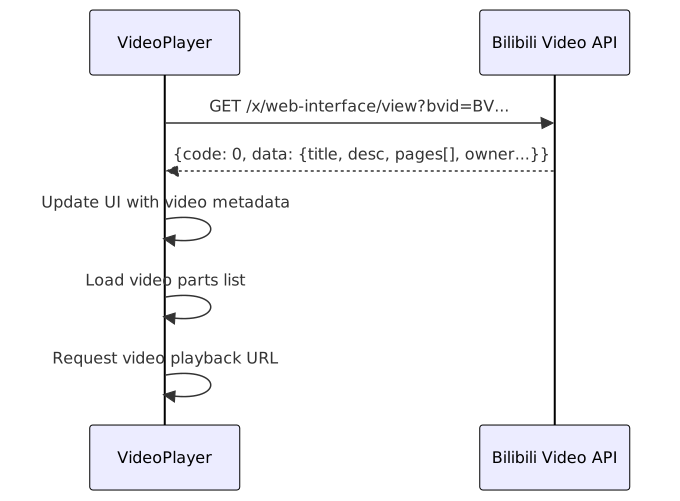
The extension uses this API to retrieve metadata about videos, including title, description, author, and component media (like multiple parts).
Endpoint: https://api.bilibili.com/x/web-interface/view
Parameters:
bvid- Video ID in BV formataid- Alternative video ID format
Usage example:
Sources: js/components/player.js:126-147
3.2 Video Playback URL API
Used to obtain the actual video stream URL for playback.
Endpoint: https://api.bilibili.com/x/player/playurl
Parameters:
bvid- Video IDcid- Content ID (obtained from video info)qn- Quality levelplatform- Platform type (html5)high_quality- Request high quality (1 or 0)
Implementation:
// From player.js
$.get(`https://api.bilibili.com/x/player/playurl?type=mp4&platform=html5&bvid=${bvid}&cid=${cid}&qn=64&high_quality=${this.config.HD_Quality_As_Default ? 1 : 0}`, (result) => {
    this.ele_videoContainer.attr("src", result.data.durl[0].url);
});
Sources: js/components/player.js:295-302
3.3 Danmaku (Comment Overlay) API
Fetches the XML file containing danmaku comments for a specific video.
Endpoint: https://comment.bilibili.com/${cid}.xml
Parameters:
cid- Content ID of the video
The extension parses this XML response to extract time-coded comments for overlay display.
Sources: js/components/player.js:271-293
3.4 Comments API
Retrieves user comments on videos.
Endpoint: https://api.bilibili.com/x/v2/reply
Parameters:
type- Content type (1 for video)oid- Object ID (video aid)pn- Page numberps- Page size (items per page)sort- Sort method
Comment replies endpoint: https://api.bilibili.com/x/v2/reply/reply
For fetching replies to a specific comment.
Sources: js/components/player.js:153-156, js/components/player.js:259-269
3.5 Video Interaction APIs
Several endpoints for user interactions with videos:
| Action | Endpoint | Method | Parameters |
|---|---|---|---|
| Like | /x/web-interface/archive/like | POST | bvid, like, csrf |
| Coin | /x/web-interface/coin/add | POST | bvid, multiply, csrf |
| Add to Watch Later | /x/v2/history/toview/add | POST | bvid, csrf |
Sources: js/components/player.js:324-360
4. User and Space APIs
4.1 User Profile API
Retrieves information about a user.
Endpoint: https://api.bilibili.com/x/web-interface/card
Parameters:
mid- User ID
Response data includes:
- Basic user information (name, avatar)
- Level information
- Statistics (followers, following)
Sources: js/components/space.js:4-35
4.2 User Subscription API
Retrieves a list of users that the specified user is following.
Endpoint: https://api.bilibili.com/x/relation/followings
Parameters:
vmid- User ID to querypn- Page numberps- Page size (items per page)order- Sort orderorder_type- Type of ordering
Sources: js/components/space.js:116-141
4.3 User History API
Retrieves the user's video viewing history.
Endpoint: https://api.bilibili.com/x/web-interface/history/cursor
Parameters:
ps- Page size (number of items)type- Content type (archive for videos)
Sources: js/components/space.js:102-114
4.4 Multiple User Info API
Batch retrieves information for multiple users at once.
Endpoint: https://api.bilibili.com/x/polymer/pc-electron/v1/user/cards
Parameters:
uids- Comma-separated list of user IDs
Sources: js/components/message.js:131-138
5. Dynamic/Feed APIs
5.1 User Dynamic Feed API
Retrieves dynamic posts from a specific user.
Endpoint: https://api.bilibili.com/x/polymer/web-dynamic/v1/feed/space
Parameters:
host_mid- User IDoffset- Pagination offsettimezone_offset- User's timezone offsetplatform- Platform type (web)type- Content type filter (optional)
Sources: js/components/space.js:37-100, js/components/dynamic.js:116-141
5.2 All Dynamics Feed API
Retrieves the feed of all subscribed users.
Endpoint: https://api.bilibili.com/x/polymer/web-dynamic/v1/feed/all
Parameters:
timezone_offset- User's timezone offsetoffset- Pagination offsettype- Content type filterplatform- Platform type (web)page- Page number
Sources: js/components/dynamic.js:79-114
5.3 UP List API
Retrieves the list of followed content creators with updates.
Endpoint: https://api.bilibili.com/x/polymer/web-dynamic/v1/portal
Parameters:
up_list_more- Flag controlling list expansion
Sources: js/components/dynamic.js:46-77

Sources: js/components/dynamic.js:1-142
6. Messaging and Notification APIs
6.1 Message Notification APIs
Various endpoints for retrieving different types of notifications.
| Message Type | Endpoint | Parameters |
|---|---|---|
| Replies | /x/msgfeed/reply | platform, build, mobi_app, ps |
| Mentions | /x/msgfeed/at | build, mobi_app |
| Likes | /x/msgfeed/like | platform, build, mobi_app |
| System | /x/sys-msg/query_user_notify | page_size, build, mobi_app |
| Unread Count | /x/msgfeed/unread | None |
Sources: js/components/message.js:1-107
6.2 Private Message APIs
APIs for retrieving and managing private conversations.
Sessions list endpoint: https://api.vc.bilibili.com/session_svr/v1/session_svr/get_sessions
Parameters:
session_type- Type of sessionsgroup_fold- Group folding optionunfollow_fold- Unfollow folding optionsort_rule- Sort methodmobi_app- App platform
Messages endpoint: https://api.vc.bilibili.com/svr_sync/v1/svr_sync/fetch_session_msgs
Parameters:
talker_id- User ID of the conversation partnersession_type- Type of sessionsize- Number of messages to retrieve
Sources: js/components/message.js:110-160

Sources: js/components/message.js:1-231
7. Search API
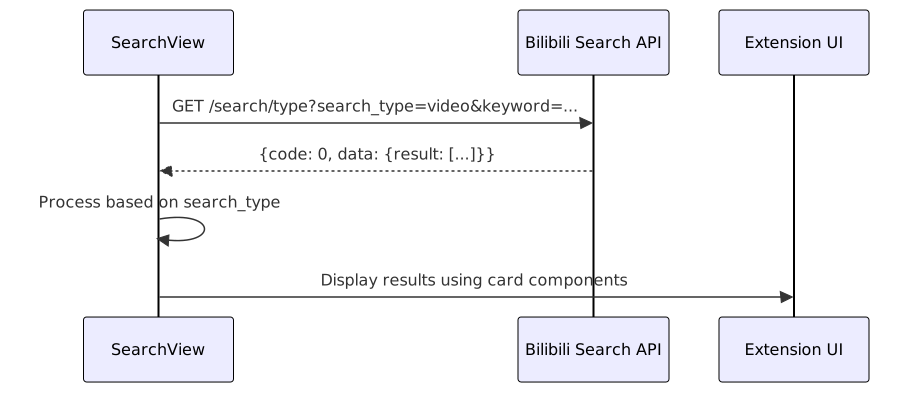
The extension uses a single endpoint for searching across different content types on Bilibili.
Endpoint: https://api.bilibili.com/x/web-interface/wbi/search/type
Parameters:
search_type- Content type to search (video, bili_user, live_room, etc.)keyword- Search querypage- Page number
The search results are processed differently based on the content type selected.
Sources: js/components/search.js:110-208
Sources: js/components/search.js:1-209
8. Favorites and Collection APIs
8.1 Collection List API
Retrieves a user's collection folders.
Endpoint: https://api.bilibili.com/x/v3/fav/folder/created/list-all
Parameters:
up_mid- User IDps- Page sizepn- Page number
Sources: js/components/space.js:143-161
8.2 Collection Content API
Retrieves items within a specific collection folder.
Endpoint: https://api.bilibili.com/x/v3/fav/resource/list
Parameters:
media_id- Collection IDps- Page sizepn- Page number
Sources: js/components/space.js:163-181
8.3 Watch Later API
Retrieves the user's "Watch Later" list.
Endpoint: https://api.bilibili.com/x/v2/history/toview
Sources: js/components/space.js:183-197, js/components/player.js:350-360
9. Error Handling
The codebase implements different approaches to error handling for API requests:
Result code checking: Most endpoints return a
codefield that is checked to determine success/failurePromise-based error handling:
javascript.done((res) => { // Success handling }) .fail((res) => { // Error handling })Try-catch blocks for parsing and processing API responses:
javascripttry { // Process response data } catch (e) { console.error("Error message", e); }
Sources: js/components/player.js:326-348, js/components/space.js:96-99, js/components/player.js:276-288
10. API Request Flow

The diagram above illustrates the typical flow of an API request within BiliChrome, from user interaction to UI update.
Sources: js/components/player.js:107-202, js/components/search.js:110-208, js/components/dynamic.js:79-141, js/components/space.js:37-100, js/components/message.js:1-99