
Navigation & Routing System
Relevant source files
The following files were used as context for generating this wiki page:
Purpose and Scope
This document describes the navigation and routing system within the BiliScape browser extension. The system is responsible for handling user navigation between different views and content types, processing URL hash changes, and managing content transitions. It serves as the central control mechanism for the extension's user interface flow.
For information about specific UI components, see UI System.
Key Components Overview

Sources: home.html:17-76, js/main.js:30-106
Navigation Structure
The BiliScape extension utilizes a side navigation bar as its primary navigation method, with content displayed in a central container area.
Side Navigation Elements
| Navigation Item | Hash Link | Function Called |
|---|---|---|
| Home | #nav_home | home.display() |
| Dynamic | #nav_subscriptions | dynamic.display() |
| Search | #nav_search | search.display() |
| Message | #nav_message | messageInit() |
| User Space | #nav_space | spaceInit() |
Sources: home.html:20-72, js/main.js:137-154
The navigation bar is implemented in HTML using Sober UI components (<s-navigation> and <s-navigation-item> elements):

Sources: home.html:20-72, home.html:73-76
URL Hash-Based Routing System
BiliScape implements a hash-based routing system where different views and content are displayed based on the URL hash value. This approach enables navigation without full page reloads.
Hash Format and Content Types

Sources: js/main.js:30-106
The routeCtrl Function
The core of the routing system is the routeCtrl function in main.js. It:
- Extracts the hash value from the URL
- Parses the hash to determine the content type
- Calls the appropriate function to display the content
- Handles initial loading and navigation events
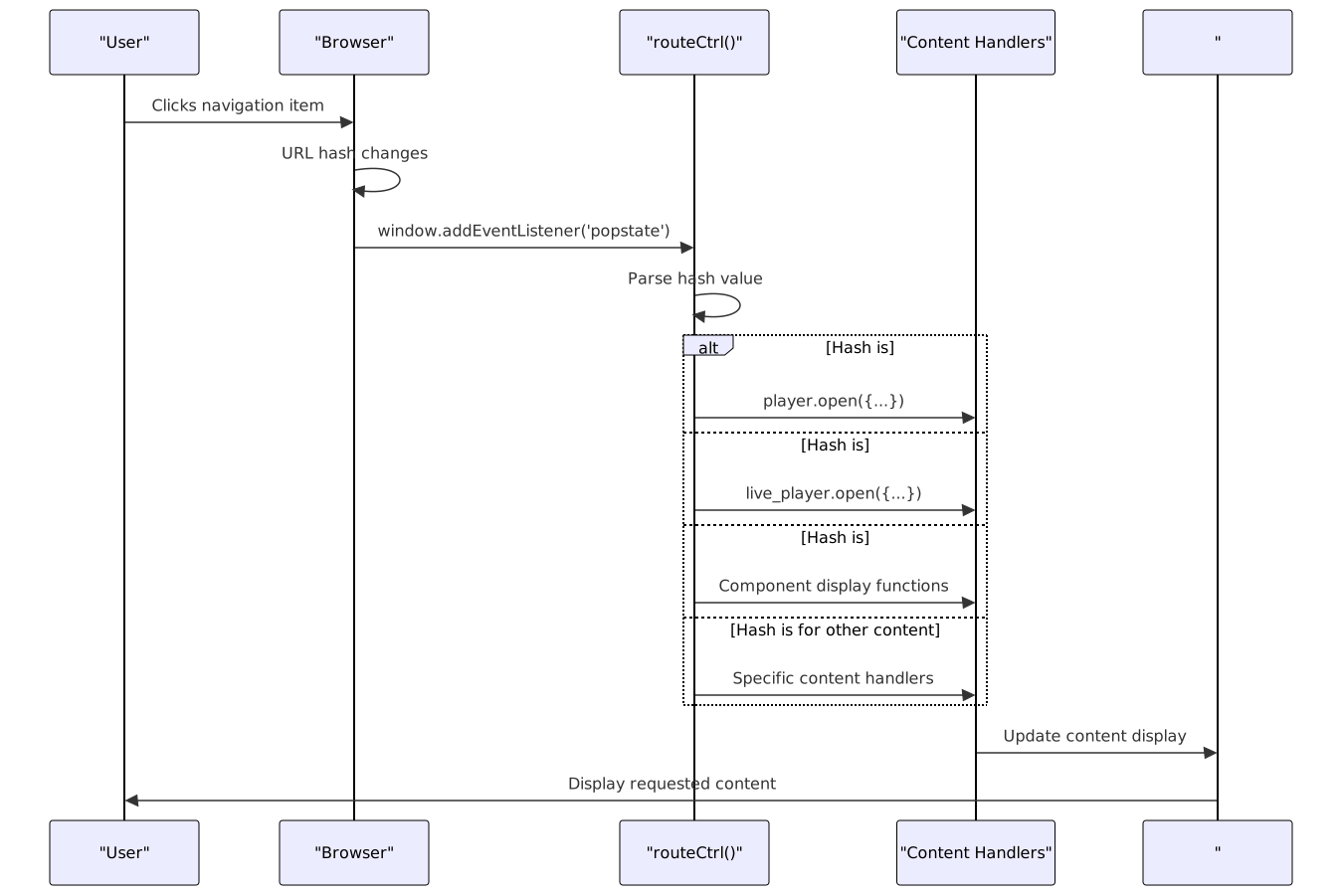
Sources: js/main.js:30-106, js/main.js:135-136
Navigation Event Handling
BiliScape handles navigation events through:
- URL hash change events (
popstate) - Click events on navigation items
- Manual hash updates from content interactions
Navigation Click Handling
When a user clicks a navigation item:
- The click event is captured
- The
currentTabvariable is updated - The appropriate display function is called
$("s-navigation-item").click((evt) => {
    const link = $(evt.currentTarget).attr("href");
    currentTab = link.substring(5);
    // Call appropriate display function based on currentTab
});
Sources: js/main.js:137-154
Refresh Functionality
The refresh button's behavior adapts to the current tab:
| Current Tab | Refresh Behavior |
|---|---|
| home | home.display(refresh = true) |
| message | messageInit(refresh = true) |
| search | search.search(search.keyword, search.page, search.type) |
| subscriptions | dynamic.display(refresh = true) |
| space | spaceInit(refresh = true) |
Sources: js/main.js:176-189
Content Loading and Display

Sources: js/main.js:30-106, js/main.js:137-154, js/main.js:176-189
Initialization Process
When the extension is first loaded, it initializes all required components and performs the initial routing:
- Component initialization (player, live_player, modal, plugin)
- Page initialization (search, dynamic, home)
- User authentication (getAccount, getJctToken)
- Initial routing (routeCtrl with isOnload=true)
- Plugin execution (plugin.run)
- Event listener setup (popstate, navigation clicks)
Sources: js/main.js:108-136
Back Navigation Support
BiliScape provides back navigation support through:
- Browser history API integration
- Custom back buttons in some views
- History state management on content transitions
// Global back button handler
$(document).on("click", ".historyBackButton", () => {
    window.history.back();
});
Sources: js/main.js:170-173
Summary
The Navigation & Routing System in BiliScape operates through a combination of:
- Hash-based routing using the URL fragment
- The central
routeCtrlfunction that parses the hash and routes to the appropriate handler - Navigation click handlers that update the current tab state
- Content handlers that render the appropriate content based on the route
- Integration with browser history for back/forward navigation
This architecture enables seamless navigation between different content types without page reloads, providing a smooth user experience while maintaining clear separation between navigation logic and content display.