
Plugin System
Relevant source files
The following files were used as context for generating this wiki page:
The Plugin System in BiliScape enables users to extend the extension's functionality through custom JavaScript plugins. This system provides a secure way to load, manage, and execute user-created or remotely-sourced scripts that can enhance or modify the browser extension's behavior.
Overview
The Plugin System is designed with the following key objectives:
- Allow users to extend extension functionality without modifying core code
- Provide a secure sandboxed environment for plugin execution
- Support both local and remote plugins
- Include safety checks to protect users from potentially malicious code
- Offer a simple user interface for plugin management

Sources: js/components/plugin.js:1-204
Architecture
The Plugin System is built around the JsPlugin class which handles all aspects of plugin management, from safety verification to execution. The class name was chosen specifically to avoid conflicts with the browser's built-in Plugin object.

Sources: js/components/plugin.js:3-113
Core Components
Plugin Storage: Plugins are stored in the browser's localStorage under two keys:
single_plugin: Stores the plugin's JavaScript codesingle_plugin_hash: Stores a hash of the plugin for verification
Plugin Interpreter: Uses the
eval5.Interpreterto run plugin code in a controlled environment, providing access to extension functionality while maintaining security.Plugin Repository: Remote plugins can be downloaded from a repository (by default on Gitee), configurable via the
remoteSourceURLproperty.
Sources: js/components/plugin.js:3-15
Plugin Safety
The system implements several safety checks to protect users from potentially malicious plugins. These checks are performed by the checkPluginSafety method.

Sources: js/components/plugin.js:19-56
Safety Checks
| Check Type | Description | Risk Level |
|---|---|---|
| Compressed Code | Checks if code lines exceed maximum length (potentially obfuscated) | Medium |
| API Calls | Detects attempts to make external API requests | High |
| LocalStorage Access | Identifies attempts to access browser storage | Medium |
| External Links | Checks for HTTP/HTTPS URLs embedded in code | Medium |
When risks are detected, the user is presented with a detailed warning and must confirm before the plugin is installed or executed.
Sources: js/components/plugin.js:19-56
Plugin Management
The Plugin System provides several methods for managing plugins:
Importing Plugins
The import() method allows users to load a plugin from a local JavaScript file:
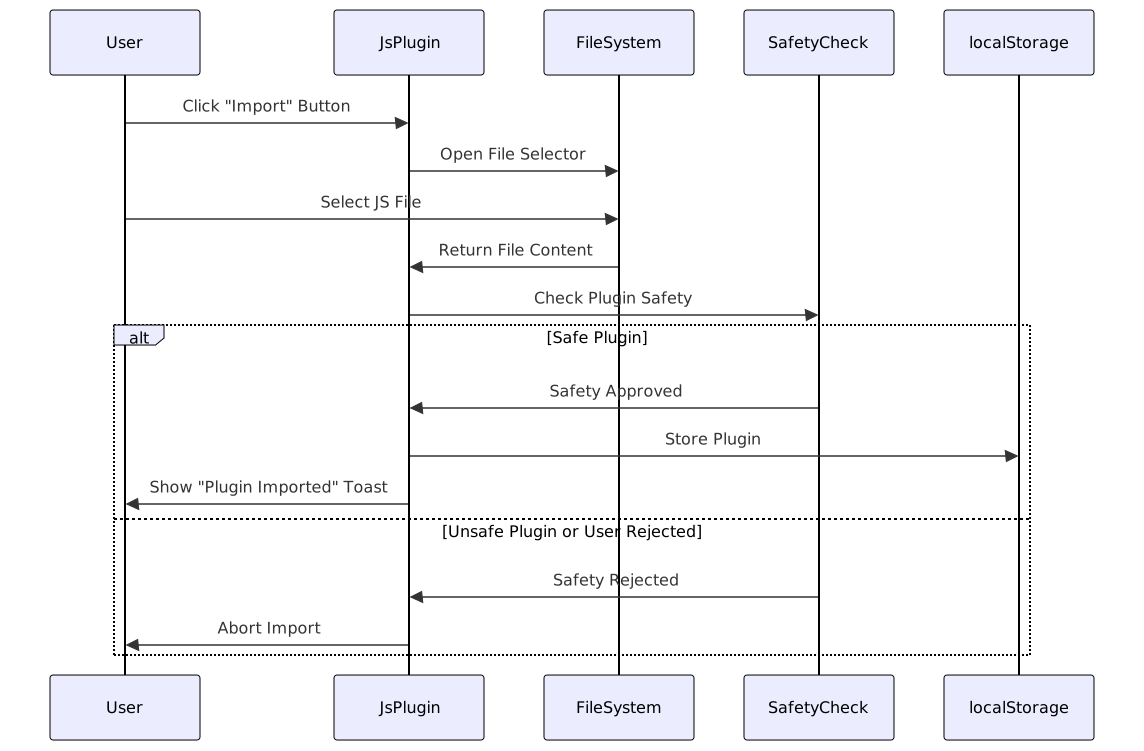
Sources: js/components/plugin.js:58-90
Removing Plugins
The delete() method removes a plugin from localStorage:
delete() {
    localStorage.removeItem(this.storeKey_script);
    localStorage.removeItem(this.storeKey_hash);
    modal.toast("插件已被移除,刷新后生效");
}
Sources: js/components/plugin.js:92-96
Running Plugins
The run() method executes the stored plugin code using the eval5 interpreter:
run() {
    let script = localStorage.getItem(this.storeKey_script);

    if (!script) { return; }
    modal.toast("插件开始执行");

    try {
        this.interpreter.evaluate(script);
    } catch (e) {
        modal.toast("插件执行出错");
        console.error(e);
    }
}
Sources: js/components/plugin.js:98-113
Plugin Manager Interface
The manager() method creates a user interface for managing plugins, allowing users to:
- Import local plugins
- Remove installed plugins
- Browse and install plugins from the remote repository

The Plugin Manager presents a simple interface with two main sections:
- Local Plugin Management: For importing and removing local plugins
- Remote Plugin Repository: Lists available plugins from the configured remote source
Sources: js/components/plugin.js:115-203
Plugin Storage
Plugins are stored in the browser's localStorage with the following structure:
| Key | Purpose | Content |
|---|---|---|
single_plugin | Stores the plugin code | JavaScript code as string |
single_plugin_hash | Verifies plugin integrity | Hash of the plugin code |
This storage approach enables plugins to persist across browser sessions but limits the extension to running one plugin at a time.
Sources: js/components/plugin.js:12-14, js/components/plugin.js:75-76, js/components/plugin.js:93-94
Remote Plugin Repository
The Plugin System connects to a remote repository (by default hosted on Gitee) to provide pre-made plugins that users can install directly. The repository URL is configured in the remoteSourceURL property.
// Default remote repository URL
this.remoteSourceURL = "https://gitee.com/EZ118/BiliChromePlugin/raw/main/plugins.json";
The repository provides a JSON file containing metadata about available plugins, including:
- Plugin name
- Author
- Description
- Version
- Download URL
Sources: js/components/plugin.js:8-10, js/components/plugin.js:158-178
Plugin Execution Flow
When a plugin is executed, it goes through the following steps:

Sources: js/components/plugin.js:98-113
Limitations and Security Considerations
Single Plugin Limitation
The current implementation only supports one active plugin at a time. This is due to the storage mechanism that uses fixed localStorage keys rather than a collection of plugins.
Security Measures
- Sandboxed Execution: Plugins are executed in a controlled environment using the eval5 interpreter
- Safety Checks: Multiple checks are performed to detect potentially harmful code
- User Warnings: Clear warnings are displayed when risky code patterns are detected
- Remote Plugin Verification: Remote plugins use a hash verification mechanism
Sources: js/components/plugin.js:19-56, js/components/plugin.js:98-113
Using the Plugin System
For Users
- Access the Plugin Manager: From the extension interface
- Import a Local Plugin: Use the "Import" button to select a JavaScript file
- Browse Remote Plugins: View and install plugins from the remote repository
- Remove a Plugin: Use the "Remove" button to uninstall the current plugin
For Plugin Developers
When developing plugins for BiliScape, keep the following in mind:
- Extension API Access: Your plugin will have access to the extension's global scope
- Safety Checks: Be aware of the safety checks that might flag your code
- Single Plugin Limitation: Only one plugin can be active at a time
- Repository Integration: For wider distribution, consider adding your plugin to the remote repository
Conclusion
The Plugin System provides a flexible way to extend the BiliScape extension with custom functionality while maintaining security and user control. Through its safety checks, sandboxed execution, and user-friendly management interface, it balances extensibility with protection against potentially harmful code.