
Extension Settings
Relevant source files
The following files were used as context for generating this wiki page:
This document provides detailed information about the settings and preferences system in the BiliScape browser extension. It covers the settings UI, available configuration options, user profile management, and the underlying implementation details.
Settings Page Overview
The BiliScape extension provides a dedicated settings page accessible through the browser's extension management interface or programmatically. The settings page is defined in options.html and powered by JavaScript in options.js.
Settings Page Structure
The settings page is organized into three main tabs, each representing a different category of settings:

Sources: options.html:15-73, options.js:182-196
Navigation System
The settings page uses the Sober UI tab component to facilitate navigation between different sections. The tab control in the settings page is implemented as a <s-tab> element with corresponding <s-tab-item> elements for each tab.
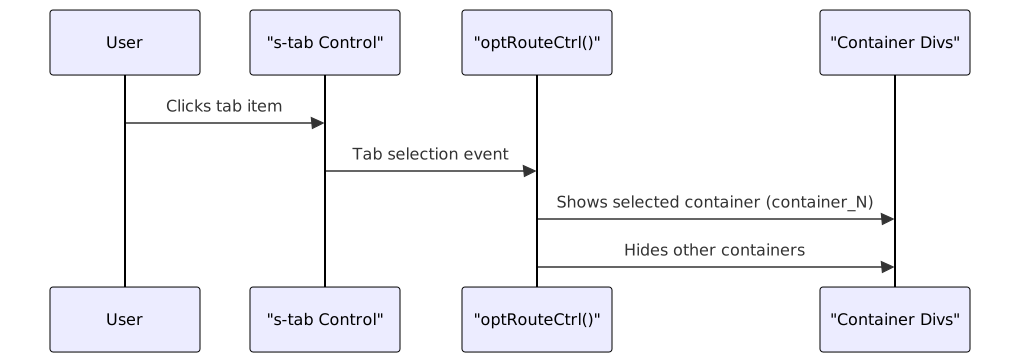
Sources: options.html:16-26, options.js:183-196
User Profile Management
The settings page displays the user's profile information retrieved from Bilibili's API. The user card shows profile picture, username, signature, and provides quick access to the user's Bilibili space.
User Information Retrieval

Sources: options.js:6-46, options.js:91-133
The user profile data is cached in the extension storage and can be refreshed via a dedicated button. When refreshed, the system calls the Bilibili API again to fetch the latest user information.
Player Preferences
The Player Settings tab allows users to configure video playback preferences that affect how videos are played within the extension.
Available Player Preferences
| Preference | Type | Description |
|---|---|---|
| HD_Quality_As_Default | Boolean | When enabled, videos will automatically play in high definition quality |
| Advanced_DanMu_As_Default | Boolean | When enabled, advanced danmaku features are activated by default |
| DanMu_Color | String | Sets the default color for danmaku text |
| Notify_Dynamic_Update | Boolean | Enables notifications for new content updates |
Sources: options.js:135-141
Player Settings Implementation
The player settings are implemented using a dynamic approach that automatically renders form controls based on the settings stored in the extension's storage:

Sources: options.js:135-180
Subscription Export Feature
BiliScape provides functionality to export user subscriptions in a format compatible with PipePipe (another Bilibili client). This feature fetches the user's followed accounts from Bilibili's API and converts the data to PipePipe's JSON format.
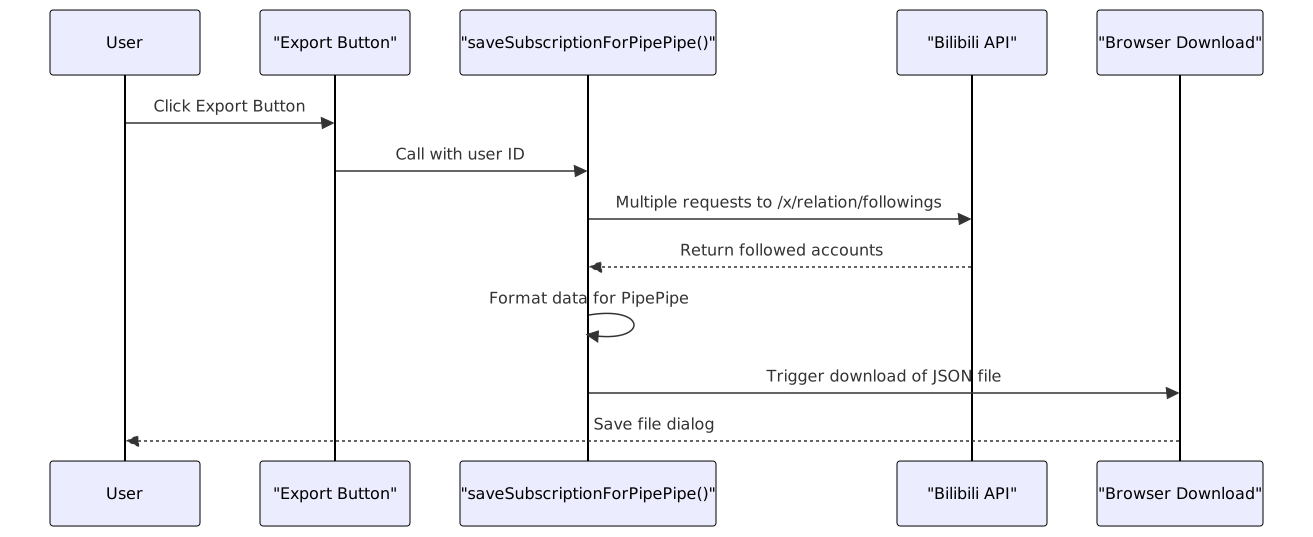
Sources: options.js:68-87, options.js:220-232
Settings Storage Mechanism
Storage Implementation
BiliScape uses the browser extension storage API to persist user settings across sessions. The settings are stored in two main categories:
- User account information - Stored with the key "account"
- Player preferences - Stored with the key "player"
The extension employs utility functions to interact with the storage:

Sources: options.js:135-141, manifest.json:10-19
Default Settings
When the user hasn't configured settings or when the settings are reset, BiliScape uses the following default player preferences:
{
  "HD_Quality_As_Default": false,
  "Advanced_DanMu_As_Default": false,
  "DanMu_Color": "white",
  "Notify_Dynamic_Update": false
}
Sources: options.js:137-141
Settings Access from Other Components
Other components in the BiliScape extension access these settings through the same storage mechanism. The player components player.js and live_player.js retrieve the settings at initialization time to configure their behavior according to user preferences.

Sources: options.js:135-141, options.js:169-177
Conclusion
The BiliScape extension provides a comprehensive settings system that allows users to customize their experience. The settings are organized into logical categories, persist across browser sessions using the extension storage API, and influence various aspects of the extension's functionality, particularly video playback behavior.