
Media Players
Relevant source files
The following files were used as context for generating this wiki page:
This document provides comprehensive technical documentation for the media playback systems in BiliChrome. These components handle video and live streaming playback functionality, including content loading, user controls, and comment/danmu display.
For information on the UI system that hosts these players, see UI System. For information about content display systems that lead to media playback, see Content Display Systems.
Overview
BiliChrome implements two separate media player components:
- VideoPlayer - For standard, pre-recorded video content
- LivePlayer - For streaming live content
Both players share similar architectural patterns but have specialized features appropriate to their respective content types.
Media Player Architecture

Sources: js/components/player.js:1-361, js/components/live_player.js:1-197
Code Component Structure

Sources: js/components/player.js:1-361, js/components/live_player.js:1-197
Video Player Component
The VideoPlayer class manages the playback of standard video content from Bilibili. It handles loading video information, streaming video content, displaying comments, and providing user controls.
Key Properties
| Property | Type | Purpose |
|---|---|---|
ele_container | jQuery object | Main container for the player UI |
ele_videoContainer | jQuery object | The video element itself |
bvid, aid, cid | String | Video identifiers used for API requests |
danmuList | Array | Stores parsed comments/danmu |
config | Object | Player configuration settings |
Sources: js/components/player.js:2-26
Initialization and Configuration
The VideoPlayer constructor initializes UI element references, sets up default configuration values, and establishes event listeners for player controls. It also sets up a timer for displaying danmu (comments).
Default configuration includes:
HD_Quality_As_Default: Whether to use high-quality video by defaultAdvanced_DanMu_As_Default: Whether to use advanced danmu display modeDanMu_Color: Color setting for danmu text
Sources: js/components/player.js:2-105
Video Loading Process
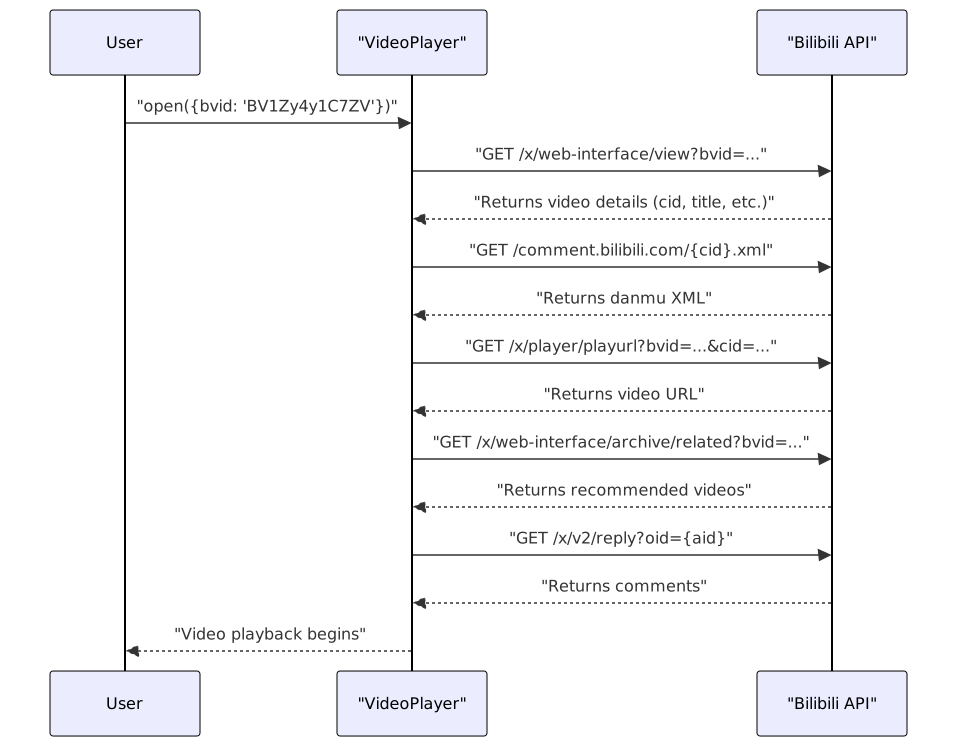
Sources: js/components/player.js:107-202
Key Methods
Opening and Closing Videos
open(option): Opens the player with specified video parameters (bvid or aid)- Fetches video information
- Loads video source
- Fetches and displays comments
- Loads related videos in sidebar
close(): Closes the player and resets state
Sources: js/components/player.js:107-214
Video Content Management
loadVideoSource(bvid, cid): Fetches and loads the video URLloadCidList(pages): Handles multi-part videos by displaying a list of partsgetDanmu(cid): Fetches and parses comment/danmu data
Sources: js/components/player.js:271-322
User Interactions
doLikeVid(bvid): Handles video likingdoGiveCoin(bvid): Handles giving coins to videosdoWatchLater(bvid): Adds videos to "Watch Later" list
Sources: js/components/player.js:324-360
Comment Handling
parseComments(comments): Parses comment data into HTMLshowMoreReplies(rpid): Shows additional comment replies
Sources: js/components/player.js:216-269
Live Streaming Component
The LivePlayer class handles live streaming content. It uses HLS.js for stream playback and includes features for real-time comment display.
Key Properties
| Property | Type | Purpose |
|---|---|---|
ele_container | jQuery object | Main container for the player UI |
ele_videoContainer | jQuery object | The video element itself |
roomid | String | Room identifier for live streams |
danmuList | Array | Stores parsed live comments |
hls | Object | HLS.js instance for streaming |
config | Object | Player configuration settings |
Sources: js/components/live_player.js:2-22
Configuration and Initialization
The LivePlayer constructor initializes UI elements, sets up configuration defaults, and establishes event listeners. Live player configuration includes:
danmuReqFrequency: How often to request new commentsdanmuMaxSum: Maximum number of displayed commentsshowDanmu: Whether to display commentsquality: Video quality setting (2=smooth, 3=HD, 4=original)
Sources: js/components/live_player.js:2-36
Live Stream Loading Process
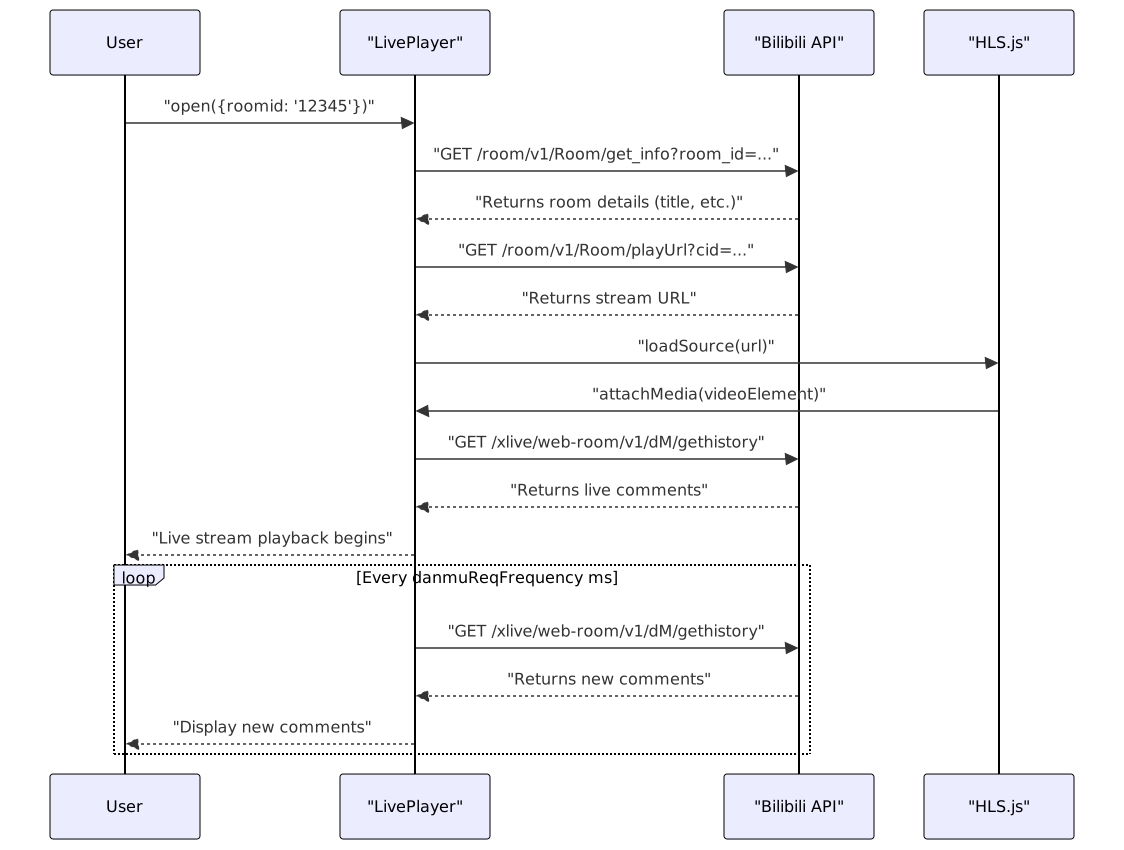
Sources: js/components/live_player.js:104-196
Key Methods
Opening and Closing Streams
open(option): Opens the player with specified room ID- Fetches stream information
- Sets up HLS playback
- Begins comment polling
close(): Closes the player, destroys HLS instance, and resets state
Sources: js/components/live_player.js:128-171
Stream Management
loadStreamSource(cid): Fetches the stream URL and initializes HLS playbackgetDanmu(room_id): Periodically polls for and displays new commentsshowDanmu(danmuList): Displays comments with animations
Sources: js/components/live_player.js:50-102, js/components/live_player.js:104-126
User Controls
toggleDanmu(): Toggles comment display on/offtogglePictureInPicture(): Enables picture-in-picture modetoggleQuality(): Switches between quality settings
Sources: js/components/live_player.js:173-196
Integration with BiliChrome
The media players integrate with the rest of BiliChrome through the routing system. When users click on video or live stream content in various parts of the UI, a hash-based routing mechanism directs them to the appropriate player.

Sources: js/components/player.js:213-214, js/components/live_player.js:170-171
Feature Comparison Table
| Feature | VideoPlayer | LivePlayer |
|---|---|---|
| Content Type | Pre-recorded videos | Live streams |
| Playback Technology | Native HTML5 video | HLS.js |
| Comment Display | XML-based historic danmu | Real-time comment polling |
| Multi-part Support | Yes (P1, P2, etc.) | No |
| User Interactions | Like, Coin, Watch Later | N/A |
| Quality Control | Standard/HD toggle | Quality level selection |
| Picture-in-Picture | Yes | Yes |
| Related Content | Recommended videos | N/A |
| Comments/Replies | Full comment system | Real-time chat only |
Sources: js/components/player.js:1-361, js/components/live_player.js:1-197