
Video Player Component
Relevant source files
The following files were used as context for generating this wiki page:
The Video Player Component is a core feature of BiliChrome that enables users to watch Bilibili videos directly within the extension. It provides a full-featured player interface including video playback, danmu (comments) display, content information, video part selection, and social interactions such as liking and commenting.
This component handles the complete lifecycle of video viewing from loading and playback to user interactions and closing. It is implemented as the VideoPlayer class in the player.js file.
For information about live streaming capabilities, see Live Streaming Component.
Component Overview
The Video Player is designed to serve as a self-contained video viewing experience with the following capabilities:
- Video loading and playback
- Video information display (title, description, metadata)
- Multi-part video navigation
- Danmu (comment) display with configurable modes
- Video interaction features (like, coin, watch later)
- Comment browsing and interaction
- Related video recommendations

Sources: js/components/player.js:1-361
Integration with Extension Architecture
The Video Player component integrates with several other components of the BiliChrome extension:

Sources: js/components/player.js:1-361
Component Initialization and Configuration
The VideoPlayer is initialized when the extension loads but remains hidden until explicitly opened. During initialization, it sets up DOM references and configures default settings.
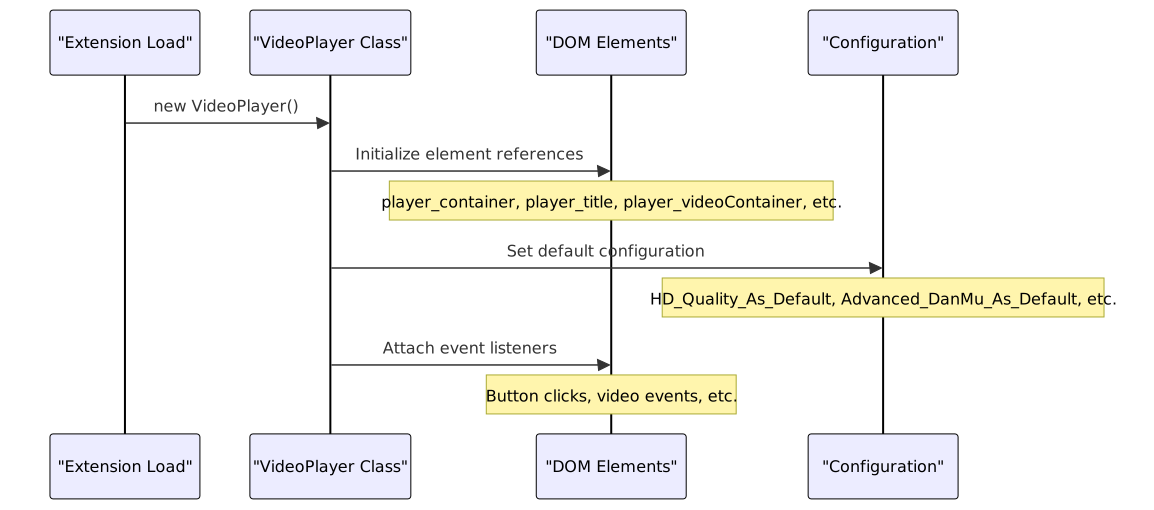
Key configuration options include:
| Setting | Description | Default |
|---|---|---|
HD_Quality_As_Default | Whether to use high-quality video by default | false |
Advanced_DanMu_As_Default | Whether to use advanced danmu mode | false |
DanMu_Color | Color for danmu text | #FFFFFF |
Sources: js/components/player.js:21-35
Video Loading and Display Process
When a user selects a video, the component goes through a comprehensive loading process to fetch and display the video content.

Sources: js/components/player.js:107-202, js/components/player.js:295-302
Video Source Handling
The component fetches video source URLs from Bilibili's API and handles video quality selection:

The video quality can be toggled at any time using the quality button, which reloads the video source with the new quality setting.
Sources: js/components/player.js:295-302, js/components/player.js:54-59
Danmu (Comment) System
The VideoPlayer implements two danmu display modes: Simple and Advanced. Danmu are comments that can be displayed on the video.

The danmu display mode can be toggled at any time using the player_scrSwitchBtn button, which updates the configuration and clears the current display.
Sources: js/components/player.js:271-293, js/components/player.js:74-95, js/components/player.js:45-49
User Interaction Features
The Video Player provides several user interaction features that integrate with Bilibili's social functions:

These interactions are tied to the user's Bilibili account and require authentication tokens to function.
Sources: js/components/player.js:324-360, js/components/player.js:41-59
Multi-part Video Support
Many Bilibili videos consist of multiple parts or episodes. The Video Player handles these with a part selection interface:

The part selection UI is displayed in the description area and allows users to switch between different parts of the same video.
Sources: js/components/player.js:304-322
Comment System Integration
The Video Player fetches and displays comments for the video, including support for viewing replies:

The component handles both top-level comments and nested replies, displaying them in a modal dialog when requested.
Sources: js/components/player.js:216-269, js/components/player.js:153-164
API Integration Details
The Video Player integrates with multiple Bilibili API endpoints:
| Function | API Endpoint | Purpose |
|---|---|---|
| Video Info | api.bilibili.com/x/web-interface/view | Get video metadata |
| Video URL | api.bilibili.com/x/player/playurl | Get video source URL |
| Danmu | comment.bilibili.com/${cid}.xml | Get video comments |
| Comments | api.bilibili.com/x/v2/reply | Get text comments |
| Replies | api.bilibili.com/x/v2/reply/reply | Get comment replies |
| Like | api.bilibili.com/x/web-interface/archive/like | Like a video |
| Coin | api.bilibili.com/x/web-interface/coin/add | Give coins to a video |
| Watch Later | api.bilibili.com/x/v2/history/toview/add | Add to watch later |
| Related Videos | api.bilibili.com/x/web-interface/archive/related | Get related videos |
All API calls include the necessary authentication tokens for the currently logged-in user.
Sources: js/components/player.js:107-202, js/components/player.js:324-360
Technical Implementation Details
The Video Player is implemented using a combination of native JavaScript, jQuery, and the HLS.js library for video streaming:

Key implementation details:
- jQuery is used for DOM manipulation and AJAX requests
- Video playback is managed through the HTML5 video element
- Danmu are implemented using a combination of HTML elements and CSS animations
- Comments and UI components utilize the Sober UI framework components
Sources: js/components/player.js:1-361, js/vendor/jquery.min.js:1-1, js/vendor/hls.min.js:1-1
User Interface Components
The Video Player's UI consists of several key components:

The UI is designed to provide quick access to all functionality while maintaining a clean viewing experience.
Sources: js/components/player.js:3-8, js/components/player.js:37-43, js/components/player.js:61-71
Conclusion
The Video Player Component is a central feature of the BiliChrome extension, providing a fully-featured Bilibili video viewing experience directly within the extension. It combines video playback, danmu display, user interactions, and content information in a unified interface.
The component's modular design allows for easy configuration and interaction with other parts of the extension, while its comprehensive API integration ensures users have access to all core Bilibili features.