
Content Display Systems
Relevant source files
The following files were used as context for generating this wiki page:
This document provides an overview of the content display systems in the BiliChrome extension. These systems are responsible for fetching, organizing, and rendering various Bilibili content types into interactive UI components. The content display architecture provides a consistent framework for showing videos, live streams, user information, and other content types across different views.
For specific information about individual views, please refer to their dedicated pages:
Core Architecture
The content display system in BiliChrome follows a modular architecture with three key components:
- Content Components - View-specific handlers that fetch and process content data
- Card System - Reusable rendering functions that generate consistent HTML for different content types
- Container Elements - DOM elements where rendered content is displayed
Card Rendering System Architecture
This diagram shows the primary card rendering system used throughout the extension:

Sources: js/components/cards.js:1-138
Content Card Types
The extension uses specialized card renderers for different content types, providing consistent UI while adapting to each content type's specific attributes.
Card Type Comparison
| Card Type | Function | Use Cases | Key Elements |
|---|---|---|---|
| Video | card.video() | Home page, search results | Thumbnail, title, author name |
| Video (slim) | card.video_slim() | Related videos sidebar | Smaller thumbnail, compact layout |
| Live | card.live() | Live stream listings | Stream thumbnail, title, streamer name |
| User | card.user() | User search results, following lists | User avatar, username, bio/signature |
| Bangumi | card.bangumi() | Anime/manga listings | Cover image, series title, metadata |
Sources: js/components/cards.js:1-138, js/components/bangumi.js:1-55
Card Rendering Process
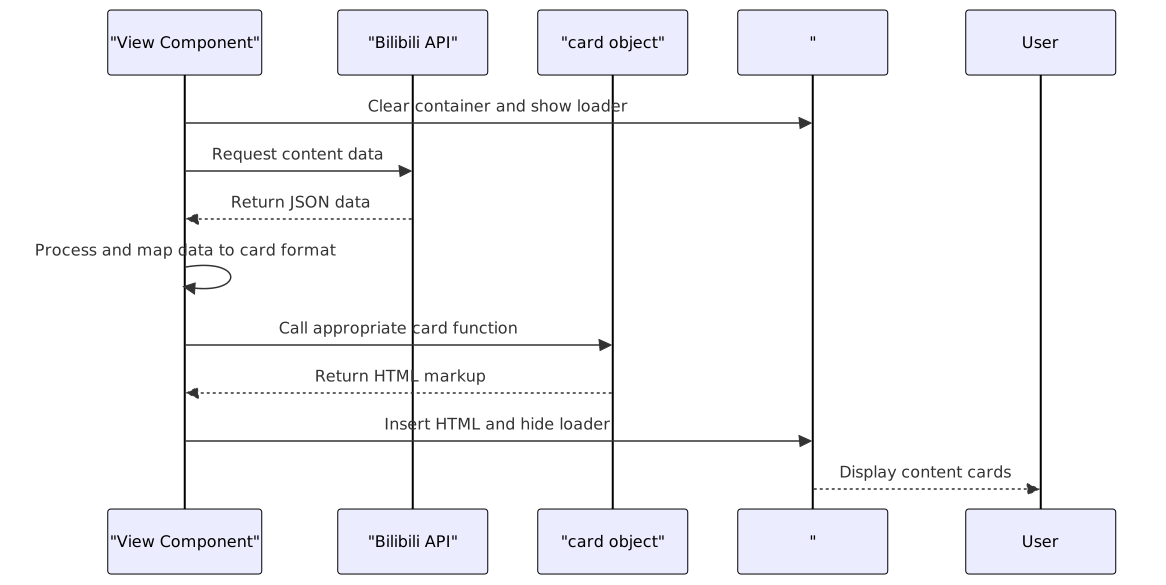
Sources: js/components/home.js:57-88
Content Views
Each content view represents a specific category of content and has its own specialized display logic.
Home View Content Tabs
The home view provides three distinct content tabs, each fetching and displaying different content types:

Sources: js/components/home.js:1-137
Modal Dialog System
The modal dialog system provides a flexible container for displaying detailed content or interactive interfaces outside the main content flow.
Modal Component Architecture

Sources: js/components/modal.js:1-75
Modal Dialog Interaction Flow
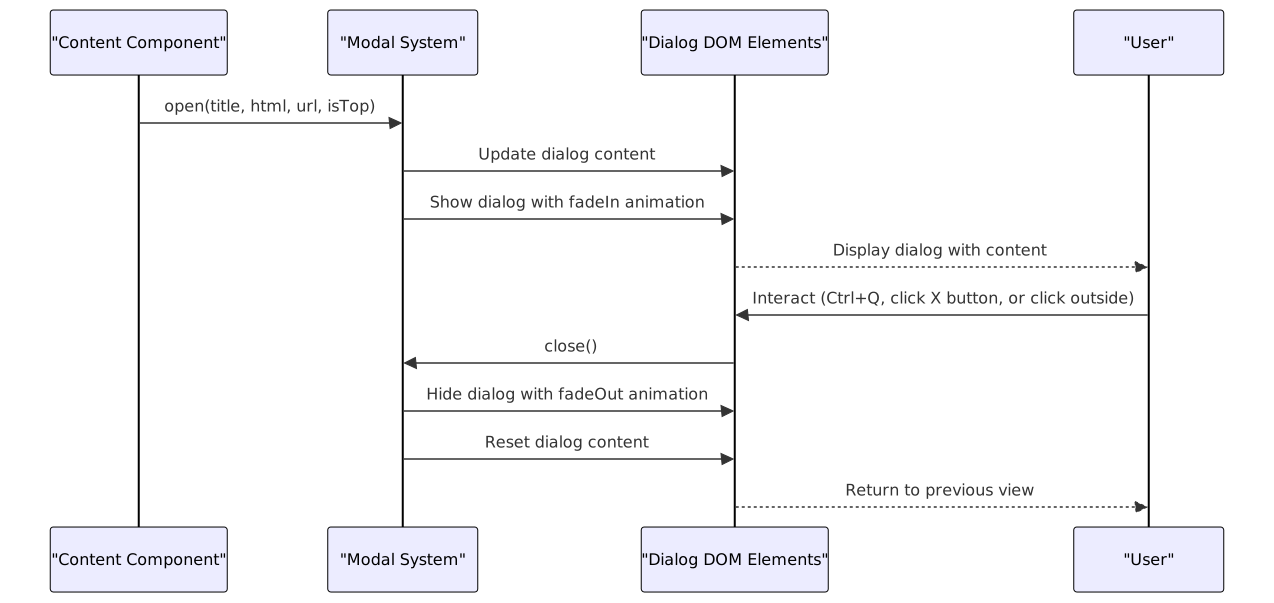
Sources: js/components/modal.js:29-54, js/components/modal.js:78-102
Content Navigation Flow
This diagram illustrates how users navigate between different content types and views in the extension:

Sources: js/components/home.js:1-137, js/components/cards.js:1-138
Data Transformation Process
A key aspect of the content display system is the transformation of API data into a standardized format suitable for card rendering:

Sources: js/components/home.js:66-77, js/components/home.js:96-108, js/components/home.js:124-130
Integration with Other Systems
The content display systems integrate closely with several other components of the extension:
- Media Players - Content cards link to either the video player or live player when clicked
- Navigation System - Content navigation is handled through URL hash changes
- UI Framework - Uses the Sober UI components (
s-card,s-chip) for rendering - Modal System - Used for displaying additional content details or interactive interfaces
- Bilibili API - Each content view makes specific API requests to retrieve content data
Sources: js/components/home.js:1-137, js/components/cards.js:1-138, js/components/modal.js:1-104