
Search System
Relevant source files
The following files were used as context for generating this wiki page:
This document describes the search functionality in BiliScape, including its user interface, implementation details, and integration with Bilibili's search API. The search system allows users to look up videos, live streams, and user accounts using keywords.
Overview
The Search System provides a clean, intuitive interface for users to search Bilibili content directly within the extension. It supports multiple content types and maintains a search history for convenience.

Sources: js/components/search.js:1-209
Search Interface Components
The search interface consists of several key elements:
- Search Landing Page: Initial interface with search box and history
- Results Page: Displays search results with content type tabs
- Pagination Controls: For navigating through multiple pages of results
Search Landing Page
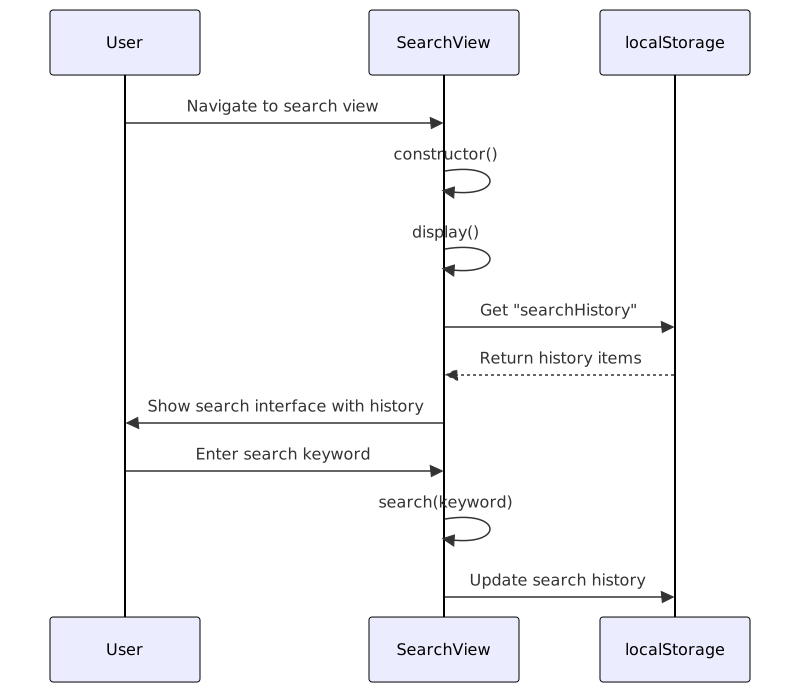
When the search view is activated, users are presented with a search input field and their search history (if available). The history is stored in the browser's localStorage for persistence across sessions.
Sources: js/components/search.js:35-107
Search Results Interface
After submitting a search query, the results page displays matching content based on the selected type (video, user, or live stream). The interface includes type tabs for filtering and pagination controls.
Type Filtering
Search results can be filtered by three content types:
| Type Value | Description | API Parameter | Card Rendering Method |
|---|---|---|---|
| video | Videos and episodes | search_type=video | card.video() |
| bili_user | User accounts | search_type=bili_user | card.user() |
| live_room | Live streaming rooms | search_type=live_room | card.live() |
Sources: js/components/search.js:110-208, js/components/cards.js:1-138
Implementation Details
The search functionality is implemented through the SearchView class in js/components/search.js, which manages both the UI and API interactions.
Core Methods
The SearchView class contains two primary methods:
- display(): Renders the initial search interface
- search(): Performs the API request and renders results

Sources: js/components/search.js:1-34
Search Request Flow
When a user initiates a search, the system performs the following operations:
- Updates UI to show loading state
- Makes an HTTP request to Bilibili's search API with appropriate parameters
- Processes the response data
- Creates appropriate card elements based on the content type
- Renders pagination controls
- Updates the DOM with search results

Sources: js/components/search.js:110-208
API Integration
The search system integrates with Bilibili's search API, specifically the /x/web-interface/wbi/search/type endpoint. The request parameters include:
search_type: Specifies the content type (video, bili_user, live_room)keyword: The search query, URL-encodedpage: The results page number
// API request URL format
`https://api.bilibili.com/x/web-interface/wbi/search/type?search_type=${type}&keyword=${encodeURI(keyword)}&page=${page}`
Sources: js/components/search.js:115
Result Rendering
Search results are rendered using the card system, which provides specialized rendering functions for different content types.
Card Rendering System
The search system leverages the card object from js/components/cards.js to generate HTML for different types of search results:
- card.video(): Renders video cards with thumbnail, title, and author
- card.user(): Renders user cards with avatar, username, and bio
- card.live(): Renders live stream cards with thumbnail, title, and streamer

Sources: js/components/cards.js:1-138
Search History Management
The search system maintains a history of previous searches to improve user experience. The history is stored in localStorage under the key "searchHistory" as a JSON array.
History Operations
- Retrieval: When displaying the search interface, history is loaded from localStorage
- Addition: New search terms are added to history when a search is performed
- Deduplication: Duplicate entries are prevented
- Clearing: Users can clear their entire search history
Sources: js/components/search.js:38-43, js/components/search.js:85-94, js/components/search.js:102-107
Navigation and Routing
The search system integrates with the extension's routing mechanism. When a search result is clicked, the system updates the URL hash to navigate to the appropriate content:
- Videos:
#bvid_BVIDor#aid_AID - Users:
#uid_UID - Live rooms:
#roomid_ROOMID
This triggers the main routing controller to load the appropriate content view.
Sources: js/components/cards.js:6-7, js/components/cards.js:93-94, js/components/cards.js:114
Future Considerations
As indicated by the presence of js/components/bangumi.js, there may be future plans to extend the search system to include more specialized content types like anime/shows (bangumi).
Sources: js/components/bangumi.js:1-55