
Extension Architecture
Relevant source files
The following files were used as context for generating this wiki page:
This document provides a technical overview of BiliScape's architecture, focusing on the core components and their interactions. It describes how the extension is structured, how components are initialized, and how they communicate with each other. For information about media player functionality, see Media Players, and for plugin system details, see Plugin System.
Architecture Overview
BiliScape employs a component-based architecture centered around a main controller that orchestrates interactions between various subsystems. The extension uses hash-based routing to navigate between different views without page reloads.

Sources: manifest.json:1-33, js/main.js:1-13, home.html:290-308
Core Components
The extension consists of several key components, each responsible for specific functionality:
| Component | Implemented In | Role |
|---|---|---|
| Main Controller | main.js | Central controller, handles routing and component initialization |
| Video Player | player.js | Handles video playback and related controls |
| Live Player | live_player.js | Manages live stream playback and features |
| Modal | modal.js | Manages dialogs, notifications, and toasts |
| Plugin System | plugin.js | Handles loading and execution of extension plugins |
| UI Views | home.js, dynamic.js, search.js, message.js, space.js | Manage different content sections |
Sources: js/main.js:1-13, home.html:290-308
Initialization Process
When the extension launches, components are initialized in a specific sequence to ensure proper functionality.
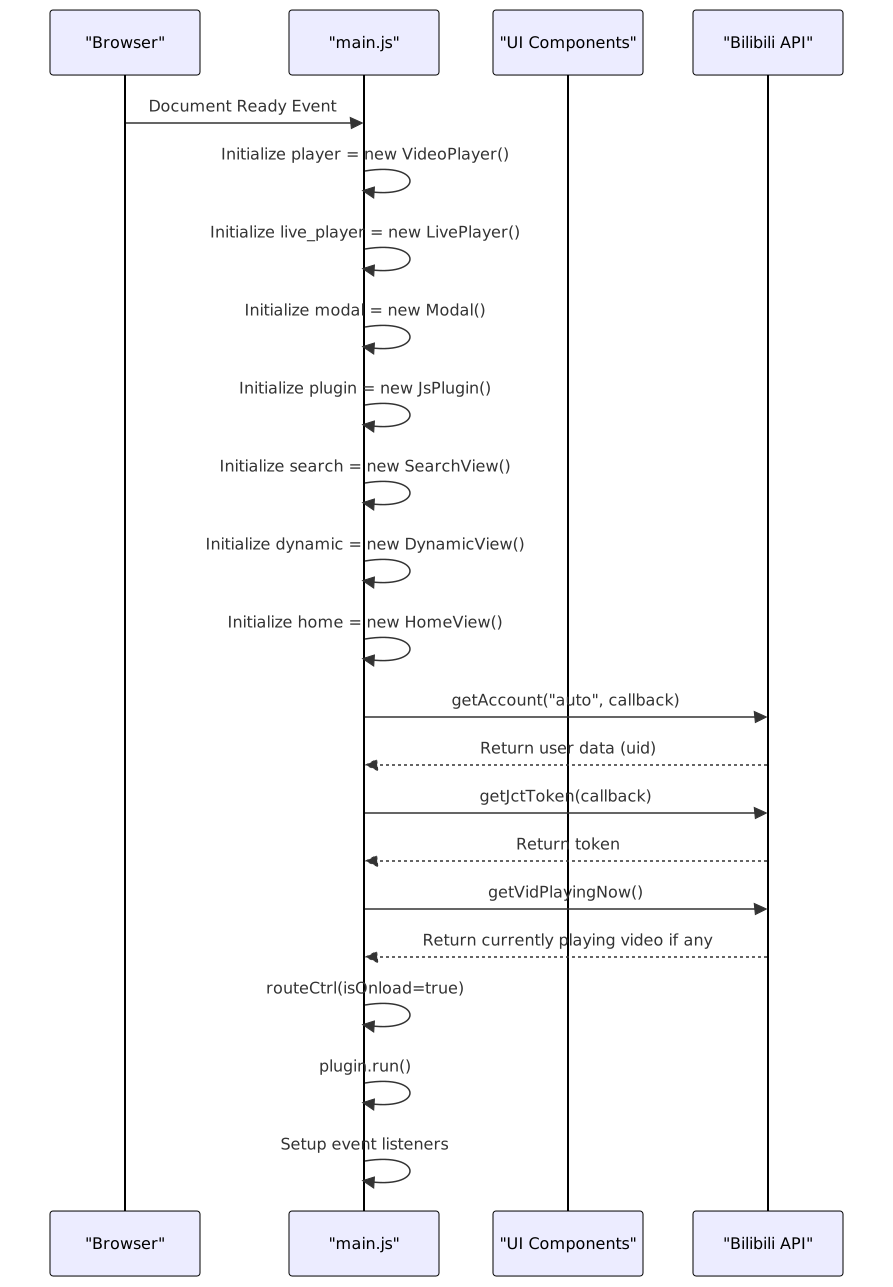
Sources: js/main.js:108-133
Routing System
The extension uses a hash-based routing system to navigate between different views without page reloads. The routeCtrl() function in main.js processes the URL hash and determines what content to display.

Sources: js/main.js:30-106, js/main.js:138-154
Component Interaction
Components interact primarily through the main controller, which holds references to all component instances. This centralized approach simplifies communication between components.
Example component relationships:
- The main controller initializes all components and maintains references to them
- Navigation items trigger the main controller to update the current tab and display appropriate content
- Content components (Home, Dynamic, etc.) call media player components when media content is selected
- All components can access the modal component for displaying dialogs and notifications
Sources: js/main.js:1-13, js/main.js:108-133, js/main.js:138-154
Permission Model
The extension requires several permissions to function properly, as defined in the manifest file:
| Permission | Purpose |
|---|---|
| notifications | Display system notifications |
| webRequest | Make web requests to Bilibili API |
| declarativeNetRequest | Modify network requests |
| cookies | Access cookies for authentication |
| contextMenus | Add context menu items |
| tabs | Interact with browser tabs |
| scripting | Execute scripts |
| storage | Store extension data |
Host permissions are granted for:
- 😕/.bilibili.com/* - Access to Bilibili APIs
- 😕/gitee.com///raw/ - Access to plugin repositories
Sources: manifest.json:10-23
Extension Integration Points
BiliScape integrates with the browser at several points:
Background Service Worker: Handles extension lifecycle events and browser integration
json"background": { "service_worker": "./js/background.js" }Browser Action: Defines the extension icon behavior
json"action": { "default_title": "BiliScape" }Options Page: Provides configuration interface
json"options_ui": { "page": "./options.html" }Context Menus: Enables right-click functionality (managed in background.js)
Sources: manifest.json:24-32
User Interface Structure
The extension's UI is built using a combination of HTML, CSS, and JavaScript components. The main UI structure is defined in home.html, which includes:
- Navigation rail with main sections (Home, Dynamic, Search, Message, Space)
- Content container for displaying the active view
- Media player containers for video and live streaming
- Dialog containers for modals and notifications
The UI uses the Sober design system components (s-page, s-navigation, s-icon-button, etc.) for a consistent Material You-inspired interface.
Sources: home.html:18-287
Refresh Mechanism
The extension includes a refresh button that allows users to reload the current view's content without reloading the entire extension:
$("#RefreshBtn").click(() => {
    /* Refresh based on current tab */
    if (currentTab == "home") {
        home.display(refresh = true);
    } else if (currentTab == "message") {
        messageInit(refresh = true);
    } // ... other tabs
});
This allows for updating content while maintaining the current state of the extension.
Sources: js/main.js:176-189
Summary
BiliScape's architecture follows a component-based design with a central controller managing interaction between UI views, media players, and support systems. The extension uses hash-based routing for navigation and integrates with browser features through the manifest permissions and background service worker. Each component is responsible for a specific functional area, making the codebase modular and maintainable.