
BiliScape Overview
Relevant source files
The following files were used as context for generating this wiki page:
Purpose and Scope
This document provides an introduction to BiliScape, a third-party browser extension client for Bilibili. It covers the extension's purpose, main features, and high-level architecture. For detailed information about specific components, please refer to their respective documentation pages in this wiki.
For information about the extension's core architecture, see Extension Architecture. For details on media playback capabilities, see Media Players.
What is BiliScape?
BiliScape is a browser extension that provides a comprehensive client interface for Bilibili (a popular Chinese video-sharing platform). It leverages Bilibili's official APIs to deliver content through a streamlined, Material You-styled interface within your browser.
The extension is designed to provide a feature-rich Bilibili experience without needing to navigate through the main website, offering dedicated views for video playback, live streaming, user profiles, content discovery, and messaging.

Sources: manifest.json:1-33, README.md:1-24
Key Features
BiliScape offers a comprehensive set of features that mirror and enhance the core functionality of Bilibili:
| Feature Category | Capabilities |
|---|---|
| Content Discovery | Home recommendations, Popular videos, Live streaming categories |
| Media Playback | Video playback (360P/1080P), Live streaming, Floating mini-player, Danmaku/Comments |
| Social Interaction | View/post comments, Follow users, View user profiles, Like/coin videos |
| User Content | User space, View history, Watch later list, Favorites |
| Messaging | Private messages, Notifications, @mentions, Comment replies |
| Customization | Dark mode, Playback settings, JavaScript plugins |

Sources: README.md:30-69
System Architecture
BiliScape follows a modular architecture with several interconnected components that handle different aspects of the extension's functionality.
Core Components

Sources: manifest.json:1-33
Navigation and Routing
BiliScape uses a hash-based routing system to navigate between different views and content. The main controller (main.js) interprets URL hash changes and loads the appropriate components.

Sources: manifest.json:24-26
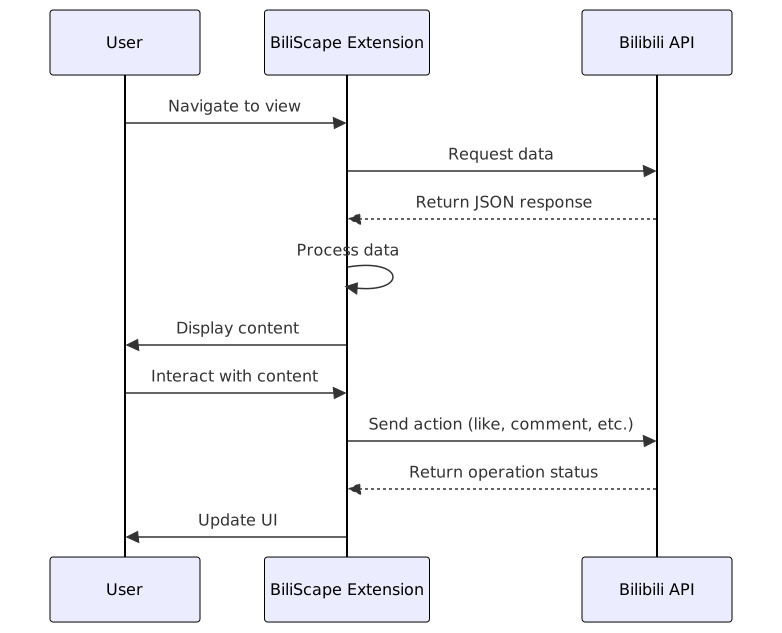
API Integration Pattern
BiliScape interacts with various Bilibili API endpoints to fetch and display content:
Sources: manifest.json:20-23
Browser Compatibility
BiliScape is designed to work across multiple browsers with minor adaptations:
| Browser | Installation Method | Notes |
|---|---|---|
| Microsoft Edge | Microsoft Addons | Fully supported |
| Firefox | Firefox Add-ons | Uses Firefox-specific manifest |
| Chrome | Developer Mode/Manual installation | Load unpacked or drag zip file |
The extension requires specific permissions to function properly, including notifications, webRequest, cookies, contextMenus, tabs, scripting, and storage.
Sources: manifest.json:10-19, README.md:25-28
Plugin System
BiliScape includes a JavaScript plugin system that allows users to extend the functionality of the extension:

The plugin system is based on eval5.js and supports ES5 standard JavaScript. Plugins can access the extension's DOM, functions, variables, and data after the page loads.
Sources: README.md:70-75
Security and Privacy Considerations
BiliScape connects to Bilibili's official APIs to retrieve content, requiring host permissions for *://*.bilibili.com/* and *://gitee.com/*/*/raw/* (for plugin functionality). Users should be aware that:
- The extension handles Bilibili account credentials
- JavaScript plugins have access to extension data and should be verified before installation
- The extension requests necessary permissions for its functionality
Sources: manifest.json:10-23, README.md:70-75
Project Status and Development
BiliScape is an active project with ongoing development. Future plans include:
- Component encapsulation
- Function documentation
- JS plugin manager improvements
- Enhanced message page functionality
- Bug fixes
For the most current information and latest features, refer to the project's repository.
Sources: README.md:89-94