
Dynamic Content System
Relevant source files
The following files were used as context for generating this wiki page:
The Dynamic Content System in BiliScape provides users with a dedicated interface to browse and interact with content updates ("dynamics") from Bilibili creators they follow. This system allows users to view aggregated updates from all followed creators or filter updates by specific creators.
For information about recommended content, see Home View. For searching content across Bilibili, see Search System.
System Architecture
The Dynamic Content System is implemented through the DynamicView class, which manages content retrieval, display, and user interaction.

Sources: js/components/dynamic.js:1-22, js/components/dynamic.js:23-44
User Interface Structure
The Dynamic Content System uses a two-panel interface:

Sources: js/components/dynamic.js:23-44
Core Functionalities
Initialization and Display
When the Dynamic Content System is activated, the display() method:
- Creates the UI structure with HTML
- Calls
getFollowList()to populate the left panel with followed creators - Calls
getAllDynamics()to display aggregated content updates in the right panel
Sources: js/components/dynamic.js:23-44
Creator List Management
The getFollowList() method:
- Adds an "All Dynamics" option at the top of the list
- Calls the Bilibili API endpoint
/x/polymer/web-dynamic/v1/portal - Renders each followed creator as a card in the left panel
- Indicates creators with new updates using a badge
- Adds a "View All" link at the bottom
// Creator list item structure
<s-card class="dynamic_listItem" type="outlined" clickable="true" uid="${item.mid}">
    <img class="avatar" src="${item.face}@42w_42h_1c.webp" loading="eager" />
    <span class="title">${item.uname}</span>
    ${item.has_update ? "<s-badge class='badge'></s-badge>" : ""}
</s-card>
Sources: js/components/dynamic.js:46-77
Content Retrieval
The system has two primary content retrieval methods:
1. getAllDynamics()
- Clears the content area and shows a loading indicator
- Makes multiple API requests to
/x/polymer/web-dynamic/v1/feed/all(pages 1-3) - Processes video data and formats it for display
- Uses the Card System to render videos in a flex container
- Manages pagination using the
lastDynamicOffsetproperty
Sources: js/components/dynamic.js:79-114
2. getUserDynamics(upUid)
- Takes a creator's UID as input
- Calls the API endpoint
/x/polymer/web-dynamic/v1/feed/space - Formats and displays only that creator's updates
Sources: js/components/dynamic.js:116-141
Data Flow
The following diagram illustrates how data flows through the Dynamic Content System:
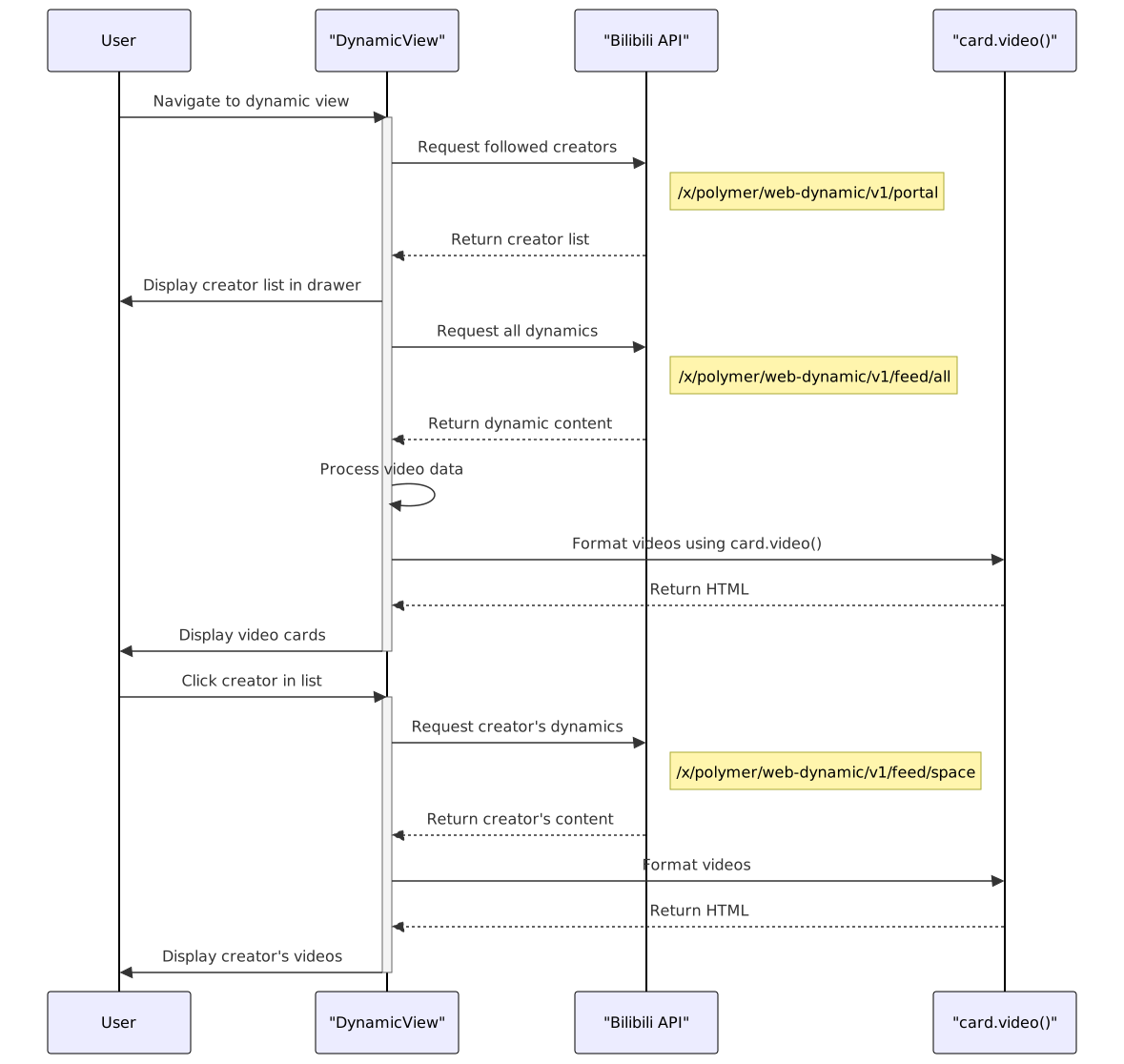
Sources: js/components/dynamic.js:79-114, js/components/dynamic.js:116-141
Video Processing and Display
The system processes video data from API responses into a standardized format for the Card System:
const vidList = response.data.items.map(item => ({
    bvid: item.modules.module_dynamic.major.archive.bvid,
    aid: item.modules.module_dynamic.major.archive.aid,
    pic: item.modules.module_dynamic.major.archive.cover,
    title: item.modules.module_dynamic.major.archive.title,
    desc: (item.modules.module_dynamic.desc ? ("动态内容: " + item.modules.module_dynamic.desc.text + "\n") : "") +
          '点赞数量: ' + item.modules.module_stat.like.count + '\n视频简介: ' +
          item.modules.module_dynamic.major.archive.desc,
    author: { uid: item.modules.module_author.mid, name: item.modules.module_author.name }
}));
This standardized data is then passed to card.video() which generates HTML for each video:
WebList += card.video(vidList);
$(".dialog_content").html("<div class='flex_container'>" + WebList + "</div>");
Sources: js/components/dynamic.js:91-103, js/components/cards.js:2-29
Event Handling
The Dynamic Content System implements two primary event handlers:
Menu Button Click: Toggles the creator list drawer visibility
javascript$(document).on("click", ".dynamic_showListBtn", () => { document.querySelector('#dynamic_container').toggle(); });Creator Selection: Loads content for the selected creator
javascript$(document).on("click", ".dynamic_listItem", (event) => { const upUid = $(event.currentTarget).attr("uid"); if (upUid === "all_dynamic") { this.getAllDynamics(); } else { this.getUserDynamics(upUid); } $(".dialog_title").text($(event.currentTarget).find(".title").text()); });
Sources: js/components/dynamic.js:7-20
Pagination Implementation
The Dynamic Content System implements basic pagination for the "All Dynamics" view using:
- A class property
lastDynamicOffsetto track the current pagination position - Multiple requests for consecutive pages (1-3) when loading all dynamics
- Passing the offset parameter to the API for subsequent pages
- Updating the offset value after each successful response
- Resetting the offset when switching views
Sources: js/components/dynamic.js:4, js/components/dynamic.js:87, js/components/dynamic.js:103, js/components/dynamic.js:110
Error Handling
The system implements error handling for API requests:
| Function | Error Handling Approach |
|---|---|
getFollowList() | Try-catch block with error logging |
getAllDynamics() | Try-catch that breaks the pagination loop on error |
getUserDynamics() | jQuery's .fail() callback with error logging |
Sources: js/components/dynamic.js:73-76, js/components/dynamic.js:104-107, js/components/dynamic.js:137-140
Integration with Card System
The Dynamic Content System leverages the Card System (specifically card.video()) to render content in a consistent format. This function:
- Takes an array of video objects as input
- Generates HTML for each video as a card with standardized structure
- Creates clickable elements with proper navigation attributes
- Includes thumbnails, titles, and creator information
Sources: js/components/dynamic.js:102, js/components/dynamic.js:135, js/components/cards.js:2-29
Summary
The Dynamic Content System enables BiliScape users to efficiently browse content updates from creators they follow on Bilibili. By providing both aggregated and filtered views, the system serves as a personalized content discovery tool within the extension.