
Message & Notification System
Relevant source files
The following files were used as context for generating this wiki page:
Purpose and Scope
This document details the Message & Notification System in BiliScape, which handles all user-to-user and system-to-user communications. This includes displaying replies, mentions, likes, system notifications, and private messages. The system provides a comprehensive interface for users to track and manage their social interactions within the Bilibili platform.
For information about dynamic content updates from followed creators, see Dynamic Content System.
System Overview
The Message & Notification System serves as a centralized hub for all communication-related functionalities within BiliScape. It aggregates various types of messages from the Bilibili platform and presents them in an organized, accessible interface.

Sources: js/components/message.js:1-231
Message Types and Components
The system handles five distinct types of messages, each with its own display format and data source.
Public Interactions
These are interactions from other users with the content created by the current user:
- Replies: Comments or responses to the user's content (videos, comments, etc.)
- Mentions: When other users mention (@) the current user
- Likes: When other users like the user's content
Each of these interaction types is fetched from a specific API endpoint and displayed in a modal dialog with a standardized format.
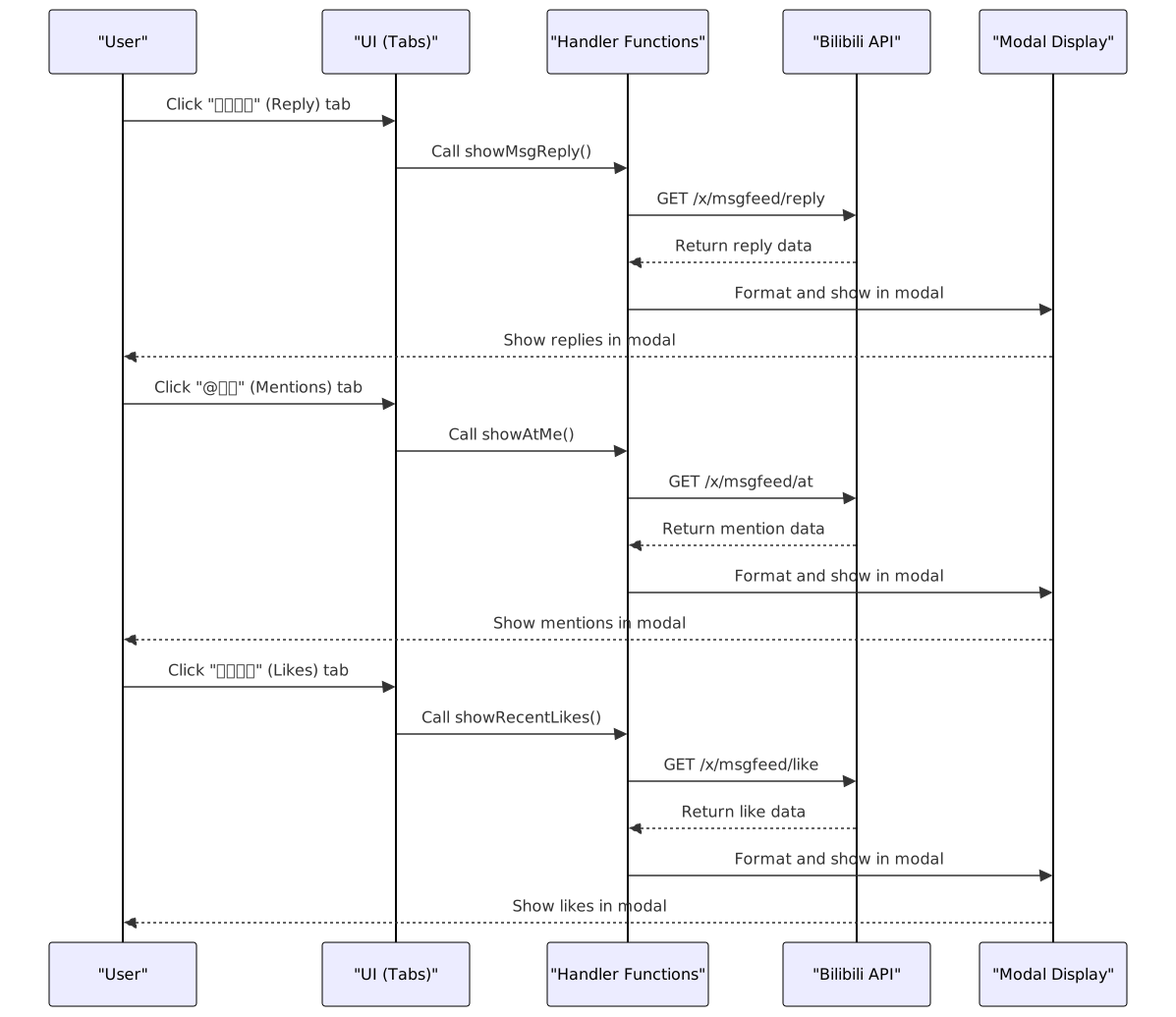
Sources: js/components/message.js:1-80
System Notifications
System notifications provide important updates from the Bilibili platform itself rather than from other users. These can include account status updates, content moderation notifications, and platform announcements.
The system fetches these notifications from the /x/sys-msg/query_user_notify endpoint and displays them in a similar format to the user interactions.
Sources: js/components/message.js:82-100
Private Messages (Chat System)
The private messaging component allows users to view and manage direct conversations with other users. It consists of:
- A session list showing recent conversations
- A detail view showing the message history with a selected user

Sources: js/components/message.js:110-160
UI Components
The Message & Notification System uses several UI components to create a cohesive user experience:
Tabbed Interface
The main navigation method for different message types using s-chip elements.
1. 回复我的 (Replies)
2. @我的 (Mentions)
3. 收到的赞 (Likes)
4. 系统通知 (System Notifications)
Chat Drawer
A slide-out drawer containing:
- A list of recent conversations (
chat_list) - A conversation detail view with message history (
dialog_content)
Badge Notifications
Small numeric indicators that show the count of unread messages for each category.
Sources: js/components/message.js:163-193
Initialization and Data Flow
The message system is initialized when a user navigates to the message tab in the extension. The initialization process sets up the UI and loads relevant data:

Sources: js/components/message.js:163-231
API Integration
The Message & Notification System integrates with several Bilibili API endpoints to fetch and display data:
| Function | API Endpoint | Purpose |
|---|---|---|
showMsgReply() | /x/msgfeed/reply | Fetch replies to user content |
showAtMe() | /x/msgfeed/at | Fetch mentions of the user |
showRecentLikes() | /x/msgfeed/like | Fetch likes on user content |
showSysMsg() | /x/sys-msg/query_user_notify | Fetch system notifications |
getMsgUnread() | /x/msgfeed/unread | Fetch unread message counts |
showMsgSessions() | /session_svr/v1/session_svr/get_sessions | Fetch list of chat sessions |
showMsgSessionDetail() | /svr_sync/v1/svr_sync/fetch_session_msgs | Fetch messages in a specific chat |
getUsersInfo() | /x/polymer/pc-electron/v1/user/cards | Fetch information about users |
Sources: js/components/message.js:2-143
Message Display Format
Each message type has a standardized display format that includes:
Public Interactions (Replies, Mentions, Likes):
- Sender information (avatar, username)
- Content context (what was replied to, where mentioned, what was liked)
- The actual content
- Action links to view the full context
System Notifications:
- Notification title
- Content message
- Timestamp
Private Messages:
- Chat list with user avatars and names
- Message bubbles differentiated between sent and received
- Support for both text and media content
Sources: js/components/message.js:5-96, js/components/message.js:113-127
Integration with Modal System
The message system relies on the Modal System to display message content in a popup dialog. Each category of public messages and system notifications is shown in a modal that includes:
- The message content
- A link to view more messages on the official Bilibili platform
Sources: js/components/message.js:21, js/components/message.js:45, js/components/message.js:78, js/components/message.js:98