
Core Extension Framework
Relevant source files
The following files were used as context for generating this wiki page:

Purpose and Scope
This document describes the foundational architecture of the BiliScape extension, focusing on the core extension framework components that enable browser integration and essential background services. This includes the manifest files, background script functionality, browser action events, and context menu integration. For information about the UI system and its components, see UI System.
Framework Overview
The core extension framework serves as the foundation layer upon which all other BiliScape features are built. It handles browser integration, event handling, and provides background services that work even when the extension's UI is not open.

Sources: manifest.json, manifest_firefox.json, js/background.js
Manifest Configuration
The manifest files serve as the extension's "blueprint" that defines its capabilities, permissions, and resource access. BiliScape provides two manifest files to support both Chrome/Chromium-based browsers and Firefox:
manifest.json- Standard manifest for Chrome and other Chromium-based browsersmanifest_firefox.json- Firefox-specific manifest with browser-specific configurations
Key Components of Manifest Files
Both manifests define:
- Extension metadata (name, version, description)
- Required permissions
- Host permissions (external domains the extension can access)
- Browser action definition
- Background script configuration
- Options page location
Cross-Browser Compatibility
The following table highlights the key differences between the Chrome and Firefox manifests:
| Feature | Chrome (manifest.json) | Firefox (manifest_firefox.json) |
|---|---|---|
| Background Script | Uses service_worker property | Uses scripts array |
| Browser-specific Settings | Not required | Includes gecko configuration with id and strict_min_version |
| Options UI | Basic configuration | Adds browser_style: true |

Sources: manifest.json:1-33, manifest_firefox.json:1-42
Background Script Architecture
The background script (background.js) provides the extension's core functionality and runs independently of the main extension UI. It handles several key responsibilities:
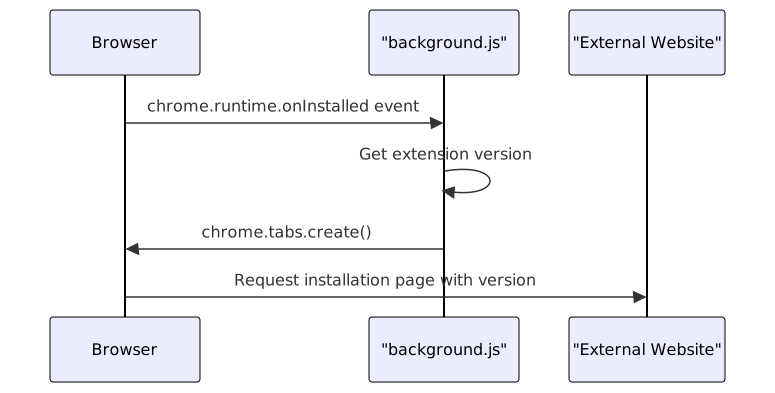
Installation Event
The background script listens for the extension's installation event and opens a welcome page with version information:
Sources: js/background.js:1-8
Context Menu Integration
BiliScape integrates with the browser's context menu to provide easy access to its features:

Sources: js/background.js:11-59
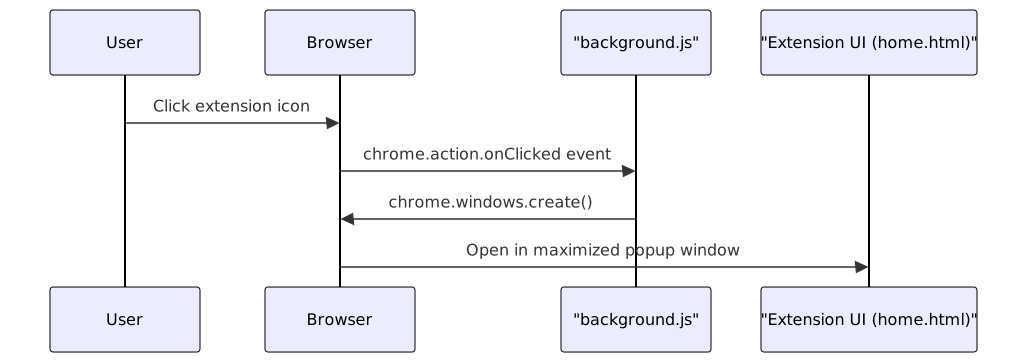
Browser Action Handler
When users click the extension's icon in the browser toolbar:
Sources: js/background.js:62-69
Notification System
The background script implements a notification system to alert users about new content:

Sources: js/background.js:72-132
Configuration System
The background script includes a configuration system to retrieve user settings from the extension's storage:

The configuration system is used to determine whether to enable notification features:
getConfig("player.Notify_Dynamic_Update", function(value){
    if(value) {
        checkForUpdates();
        setInterval(checkForUpdates, 20 * 60 * 1000);
    }
});
Sources: js/background.js:73-87, js/background.js:126-132
Extension Permissions
The core framework requires several browser permissions to function properly:
| Permission | Purpose |
|---|---|
| notifications | Enable browser notifications for content updates |
| webRequest | Monitor and modify web requests |
| declarativeNetRequest | Use declarative rules to modify network requests |
| cookies | Access cookies for Bilibili API authentication |
| contextMenus | Add items to the browser's context menu |
| tabs | Create and manage browser tabs |
| scripting | Execute scripts in the context of web pages |
| storage | Store and retrieve user settings |
Host permissions include:
*://*.bilibili.com/*- Access to Bilibili website and API*://gitee.com/*/*/raw/*- Access to remote plugin repositories
Sources: manifest.json:10-22, manifest_firefox.json:10-22
Integration with Other Components
The core extension framework integrates with other BiliScape components through several mechanisms:
- UI Integration: The browser action handler opens the main extension UI (
home.html). - Media Player Integration: The context menu handler directs users to specific video or live stream content.
- Configuration System: Provides access to user settings for all components.
- API Access: Establishes the necessary permissions for Bilibili API interactions.
For more detailed information about other components:
- For UI components, see UI System
- For navigation between components, see Navigation & Routing System
- For media player implementations, see Media Players
Sources: js/background.js, manifest.json, manifest_firefox.json